
0-traefik基础(基于file-provider)
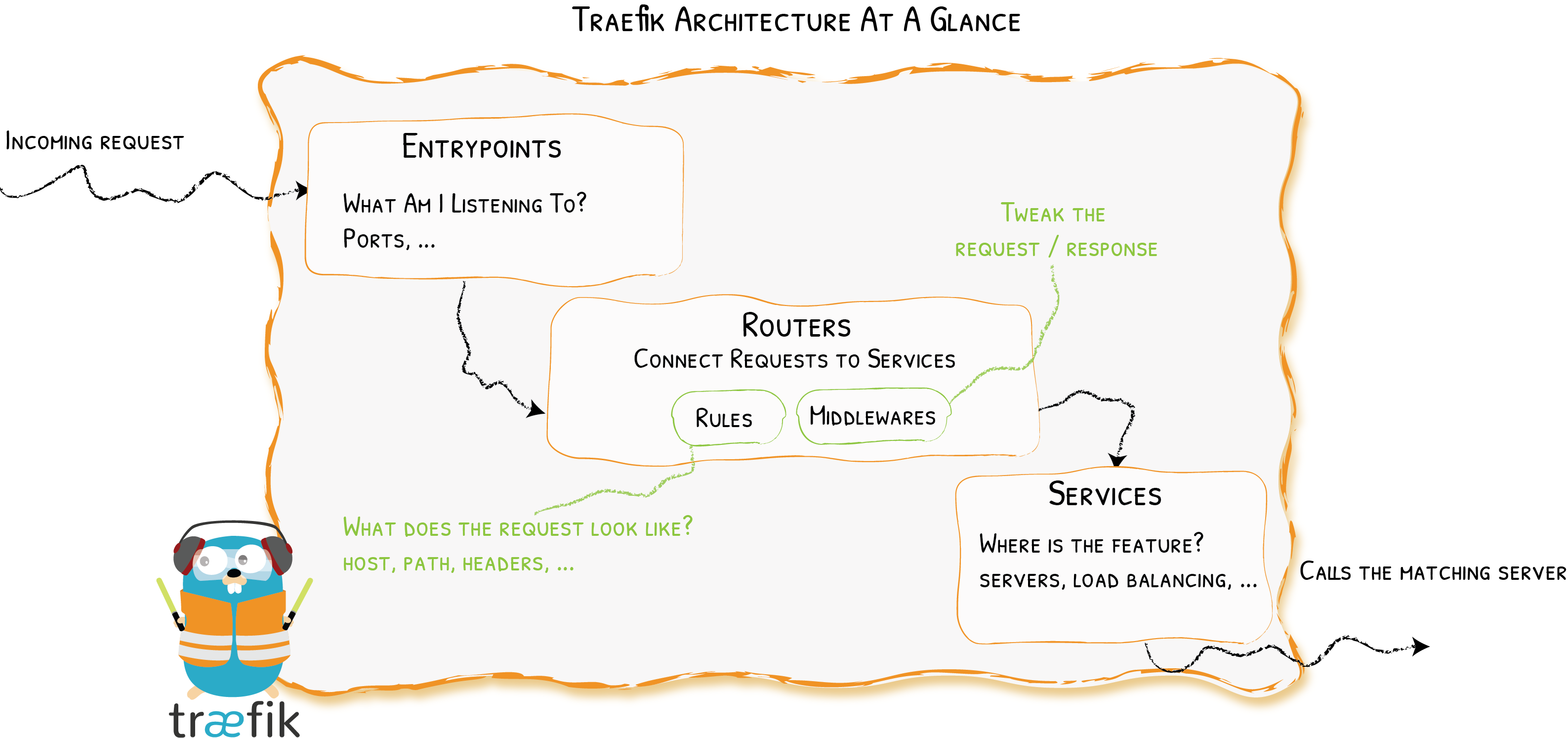
1、请求流量会经过定义的EntryPoints(监听IP和Port)
2、Routers分析流入的请求,判断是否能够匹配一系列的匹配规则(RULES)
3、如果匹配成功,Routers可能会在将requtest转发到应用服务(SERVICES)之前,通过一个或多个Middlewares将requtet进行转换处理。
- Providers 对运行在各个基础设施上的服务进行服务发现
- Entrypoints 监听传入的流量
- Routers 分析请求报文 (host, path, headers, SSL, …)
- Services 转发请求到应用服务 (load balancing, …)
- Middlewares 可能更新请求或根据请求做出相关处理决定 (authentication, rate limiting, headers, …)
服务发现是基于各个provider实现的。
修改config reload频率:
--providers.providersThrottleDuration=10s
对具有"app=traefik"这个label的CRD进行服务发现
--providers.kubernetescrd.labelselector="app=traefik"
对特定的名称空间进行服务发现:
--providers.kubernetescrd.namespaces=default,production
处理k8s events的频率:
--providers.kubernetescrd.throttleDuration=10s
Traefik除了支持http请求路由。 Traefik还支持TCP请求。要添加TCP路由器和TCP服务。
serversTransport:专用于配置Traefik与后端之间的连接所发生的情况。在静态配置中配置为全局参数,也可以在traefik service级别中定义。
## Static configuration
--serversTransport.insecureSkipVerify=true #禁用SSL证书验证。
--serversTransport.rootCAs=foo.crt,bar.crt  #使用自签名TLS证书时CA证书列表,用于验证自签证书。
--serversTransport.maxIdleConnsPerHost=7  #如果不为零,则控制每个主机的最大空闲连接。
#forwardingTimeouts:将请求转发到后端服务器时有关的超时时间。
--serversTransport.forwardingTimeouts.dialTimeout=1s #DialTimeout是建立与后端服务器的连接所允许的最大持续时间。零表示没有超时。
--serversTransport.forwardingTimeouts.responseHeaderTimeout=1s #转发请求到后端server后,接受到相应header的超时时间
--serversTransport.forwardingTimeouts.idleConnTimeout=1s  #空闲连接在保持idle状态的超时时间
EntryPoints是Traefik的网络入口点。它们定义了将接收数据包的IP、端口,以及侦听TCP还是UDP。
## Static configuration
--entryPoints.web.address=:80
#我们定义了一个称为web的入口点,它将侦听端口80。
## Static configuration
--entryPoints.web.address=:80
--entryPoints.websecure.address=:443
#定义了两个入口点:一个称为web,另一个称为websecure。web侦听端口80,而websecure侦听端口443。
## Static configuration
--entryPoints.streaming.address=:1704/udp
#定义一个UDP端口
官方文档:https://doc.traefik.io/traefik/routing/entrypoints/#configuration
## Static configuration
--entryPoints.name.address=:8888 # same as :8888/tcp
# traefik在关闭阶段(shutdown)的行为
--entryPoints.name.transport.lifeCycle.requestAcceptGraceTimeout=42
--entryPoints.name.transport.lifeCycle.graceTimeOut=42
#transport.respondingTimeouts表示Traefik实例处理incoming requests的超时时间
--entryPoints.name.transport.respondingTimeouts.readTimeout=42  #读取整个请求(包括body)
--entryPoints.name.transport.respondingTimeouts.writeTimeout=42  #写response报文
--entryPoints.name.transport.respondingTimeouts.idleTimeout=42  #长连接的超时时间
# 代理协议?
--entryPoints.name.proxyProtocol.insecure=true
--entryPoints.name.proxyProtocol.trustedIPs=127.0.0.1,192.168.0.1  #仅受信任的IP中的IP将导致远程客户端地址替换
# 配置Traefik信任X-Forwarded-*首部。
--entryPoints.name.forwardedHeaders.insecure=true
--entryPoints.name.forwardedHeaders.trustedIPs=127.0.0.1,192.168.0.1
【X-Forwarded-*】
以X-Forwarded-For为例,X-Forwarded-For (XFF) 在客户端访问服务器的过程中如果需要经过HTTP代理或者负载均衡服务器,可以被用来获取最初发起请求的客户端的IP地址,这个消息首部成为事实上的标准。在消息流从客户端流向服务器的过程中被拦截的情况下,服务器端的访问日志只能记录代理服务器或者负载均衡服务器的IP地址。如果想要获得最初发起请求的客户端的IP地址的话,那么 X-Forwarded-For 就派上了用场。
这个消息首部会被用来进行调试和统计,以及生成基于位置的定制化内容,按照设计的目的,它会暴露一定的隐私和敏感信息,比如客户端的IP地址。所以在应用此消息首部的时候,需要将用户的隐私问题考虑在内。
HTTP routing专用配置:
# Redirection:entrypoints级别的重定向
--entrypoints.web.address=:80
--entrypoints.web.http.redirections.entryPoint.to=websecure  #必选。重定向的目标
--entrypoints.web.http.redirections.entryPoint.scheme=https  #可选,默认https
--entrypoints.foo.http.redirections.entrypoint.permanent=true  #可选,默认true
--entrypoints.foo.http.redirections.entrypoint.priority=10   #可选,默认1
--entrypoints.websecure.address=:443

# Middlewares:entrypoints级别的中间件会在route级别的中间件之前生效
--entrypoints.websecure.http.middlewares=auth@file,strip@file

# TLS: entrypoints级别的TLS是应用于所有route的默认TLS配置(优先级低),其配置可能会被route级别的配置覆盖
--entrypoints.websecure.http.tls.options=foobar
--entrypoints.websecure.http.tls.certResolver=leresolver  # Let's Encrypt
--entrypoints.websecure.http.tls.domains[0].main=example.com
--entrypoints.websecure.http.tls.domains[0].sans=foo.example.com,bar.example.com
--entrypoints.websecure.http.tls.domains[1].main=test.com
--entrypoints.websecure.http.tls.domains[1].sans=foo.test.com,bar.test.com
官方文档中,此部分默认是使用file这个provider进行讲解。
router将请求连接到后端服务。
路由器负责将传入请求连接到可以处理这些请求的服务。在此过程中,路由器可以使用中间件来更新请求,或者在将请求转发到服务之前采取行动。
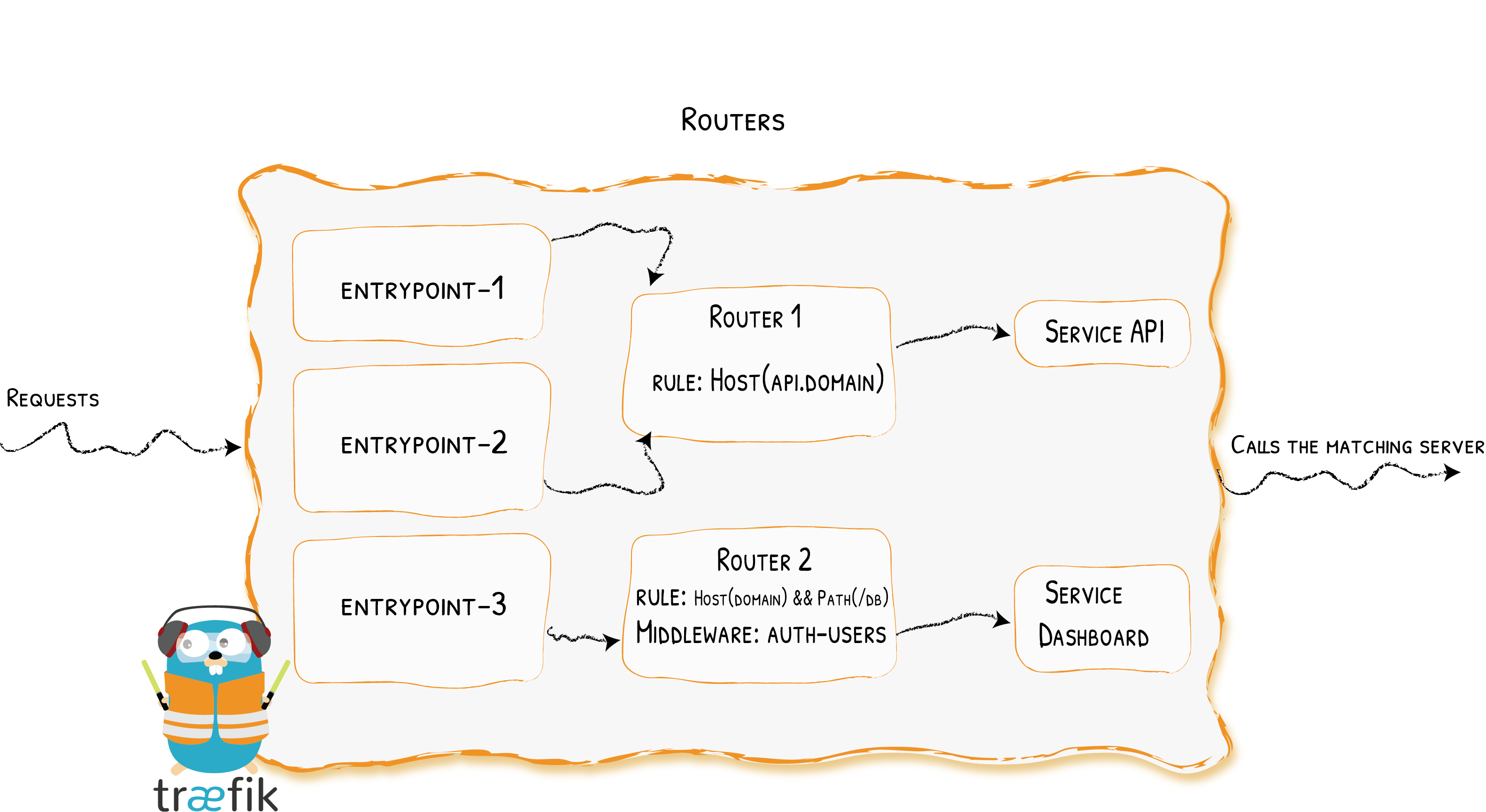
router分为3类,每一种router的配置有少许不同。
- http routers
- tcp routers
- udp routers
如果未指定,HTTP路由器将接受来自所有定义的入口点的请求。如果要将路由器范围限制为一组入口点,请设置entryPoints选项。
## Dynamic configuration
http:
  routers:
    Router-1:
      # By default, routers listen to every entry points
      rule: "Host(`foo.example.com`)"
      service: "service-1"
    Router-2:
      # won't listen to entry point web
      entryPoints:
        - "websecure"
        - "other"
      rule: "Host(`bar.example.com`)"
      service: "service-2"
## Static configuration
--entrypoints.web.address=:80
--entrypoints.websecure.address=:443
--entrypoints.other.address=:9090
规则用于确定特定请求是否与特定条件匹配。如果该规则得到验证,则路由器将变为活动状态,调用中间件,然后将请求转发到服务。
| Rule | Description |
|---|---|
Headers(key, value) | Check if there is a key keydefined in the headers, with the value value |
HeadersRegexp(key, regexp) | Check if there is a key keydefined in the headers, with a value that matches the regular expression regexp |
Host(example.com, ...) | Check if the request domain (host header value) targets one of the given domains. |
HostHeader(example.com, ...) | Check if the request domain (host header value) targets one of the given domains. |
HostRegexp(example.com, {subdomain:[a-z]+}.example.com, ...) | Check if the request domain matches the given regexp. |
Method(GET, ...) | Check if the request method is one of the given methods (GET, POST, PUT, DELETE, PATCH, HEAD) |
Path(/path, /articles/{cat:[a-z]+}/{id:[0-9]+}, ...) | Match exact request path. It accepts a sequence of literal and regular expression paths. |
PathPrefix(/products/, /articles/{cat:[a-z]+}/{id:[0-9]+}) | Match request prefix path. It accepts a sequence of literal and regular expression prefix paths. |
Query(foo=bar, bar=baz) | Match Query String parameters. It accepts a sequence of key=value pairs. |
为了避免路径重叠,默认情况下,使用规则的字符型长度以降序对路由进行排序。rule优先级等于rule规则字符串的长度。
## Dynamic configuration
http:
  routers:
    Router-1:
      rule: "HostRegexp(`.*\.traefik\.com`)"
      entryPoints:
      - "web"
      service: service-1
      priority: 1
    Router-2:
      rule: "Host(`foobar.traefik.com`)"
      entryPoints:
      - "web"
      priority: 2
      service: service-2
在此配置中,优先级配置为允许Router-2处理与foobar.traefik.com主机的请求。因为Router-2的优先级更高。
中间件的应用顺序与其在路由器中声明的顺序相同。
## Dynamic configuration
http:
  routers:
    my-router:
      rule: "Path(`/foo`)"
      # declared elsewhere
      middlewares:
      - authentication
      service: service-foo
每个请求最终都必须由服务处理,这就是为什么每个路由器定义都应包括service的原因,基本上是将请求传递到该service上。
此时被引用的service可以是k8s Service与traefik Service的任意混合。
当指定TLS时,它指示Traefik当前路由器 仅专用于 HTTPS请求(并且该路由器应忽略HTTP(非TLS)请求)。 Traefik将终止SSL连接(意味着它将解密的数据发送到服务)。
## Dynamic configuration
http:
  routers:
    Router-1:
      rule: "Host(`foo-domain`) && Path(`/foo-path/`)"
      service: service-id
      # will terminate the TLS request
      tls: {}
如果您需要为HTTP和HTTPS请求定义相同的路由,则需要定义两个不同的路由器:一个带有tls部分,一个没有。
## Dynamic configuration
http:
  routers:
    my-https-router:
      rule: "Host(`foo-domain`) && Path(`/foo-path/`)"
      service: service-id
      # will terminate the TLS request
      tls: {}

    my-http-router:
      rule: "Host(`foo-domain`) && Path(`/foo-path/`)"
      service: service-id
用于配置建立https(tls)连接时的参数。
## Dynamic configuration
http:
  routers:
    Router-1:
      rule: "Host(`foo-domain`) && Path(`/foo-path/`)"
      service: service-id
      # will terminate the TLS request
      tls:
        options: foo

tls:
  options:
    foo:
      minVersion: VersionTLS12
      cipherSuites:
        - TLS_ECDHE_RSA_WITH_AES_256_GCM_SHA384
        - TLS_ECDHE_ECDSA_WITH_CHACHA20_POLY1305_SHA256
        - TLS_ECDHE_RSA_WITH_CHACHA20_POLY1305_SHA256
        - TLS_ECDHE_ECDSA_WITH_AES_128_GCM_SHA256
        - TLS_ECDHE_RSA_WITH_AES_128_GCM_SHA256
由于tls.options引用是根据Host值来映射到主机名,因此,如果配置引入了以下情况:同一主机名(来自主机规则)与两个TLS选项引用相匹配,则会发生冲突,例如以下示例:
## Dynamic configuration
http:
  routers:
    routerfoo:
      rule: "Host(`snitest.com`) && Path(`/foo`)"
      tls:
        options: foo

    routerbar:
      rule: "Host(`snitest.com`) && Path(`/bar`)"
      tls:
        options: bar
如果发生这种情况,两个映射都将被丢弃,并且这些路由器的主机名(在这种情况下为snitest.com)将与默认的TLS选项关联。
如果定义了certResolver,Traefik将尝试基于路由器的Host&HostSNI规则生成证书。
规则Host(`test1.example.com`,`test2.example.com`) 会请求一个证书,该证书同时带有CN(为test1.example.com)和SAN(为test2.example.com)
## Dynamic configuration
http:
  routers:
    routerfoo:
      rule: "Host(`snitest.com`) && Path(`/foo`)"
      tls:
        certResolver: foo
可以为每一个main域名设置SANs,每一个main域名和sans域名都会引起一次证书请求。
## Dynamic configuration
http:
  routers:
    routerbar:
      rule: "Host(`snitest.com`) && Path(`/bar`)"
      tls:
        certResolver: "bar"
        domains:
          - main: "snitest.com"
            sans:
              - "*.snitest.com"
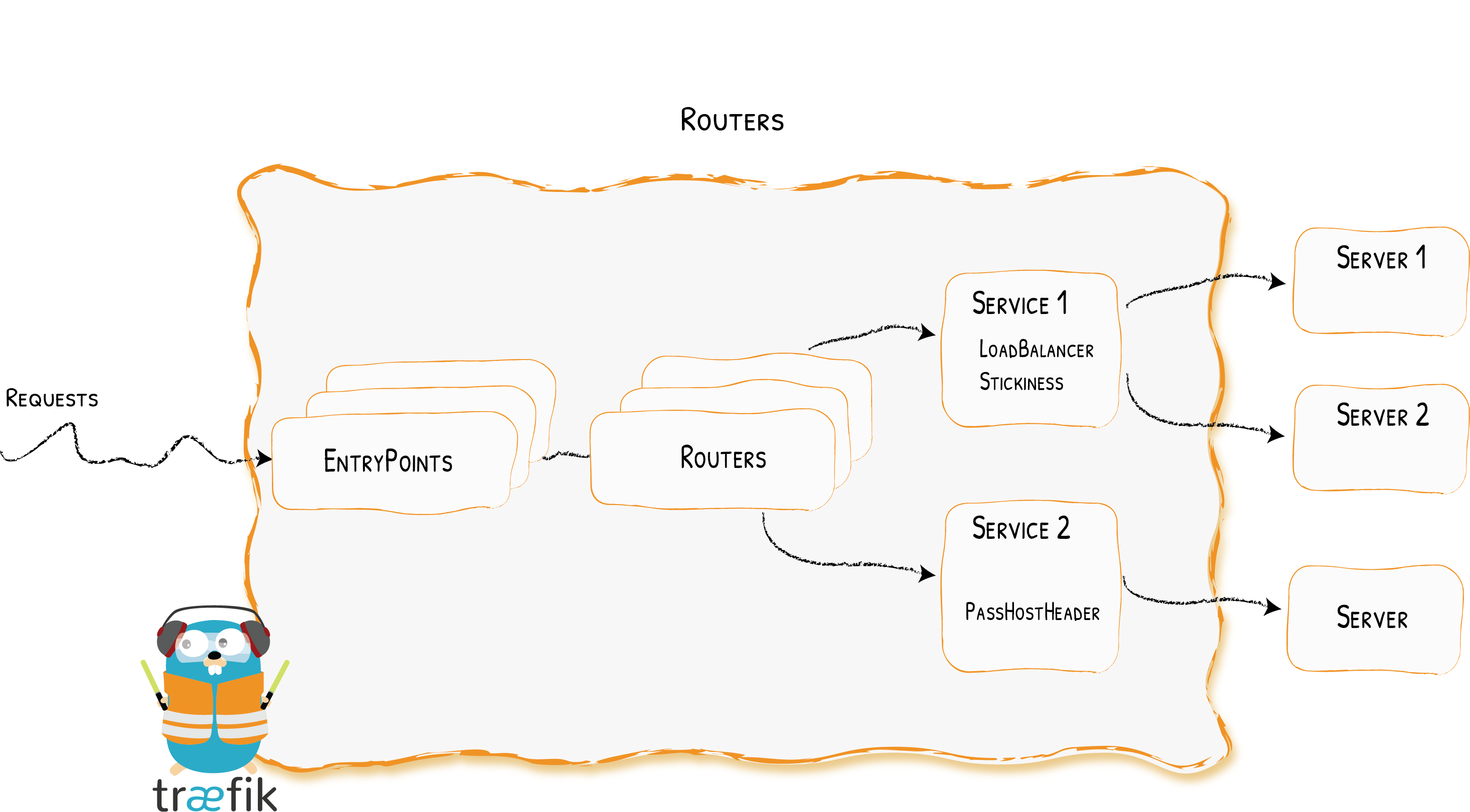
Services负责配置如何到达处理传入请求的实际服务。此处的service是比k8s中更高一级的service(在k8s service上进行封装),在k8s中的service等同于上图中的server。
Service分为3类:
- HTTP Services
- TCP Services
- UDP Services
Router可以直接引用k8s的service,也可以使用traefik的service。使用traefik的service可以实现权重轮训、镜像、配置ServersTransport参数等高级功能。
http:
  services:
    my-service:
      loadBalancer:  #round robin负载均衡策略
        servers:
        - url: "http://private-ip-server-1/"
        - url: "http://private-ip-server-2/"
apiVersion: traefik.containo.us/v1alpha1
kind: IngressRoute
metadata:
  name: ingressroutebar
  namespace: default

spec:
  entryPoints:
    - web
  routes:
  - match: Host(`example.com`) && PathPrefix(`/foo`)
    kind: Rule
    services:   # 默认就是loadBalancer类型,CRD中没有该类型
    - name: svc1
      namespace: default
    - name: svc2
      namespace: default
用于声明程序的单个实例。 url选项指向特定实例。见上例。
负责均衡策略,目前支持round robin。见上例。
如果cookie中指定的服务器不正常,该请求将被转发到新服务器(cookie将跟踪新服务器)。
## Dynamic configuration
http:
  services:
    my-service:
      loadBalancer:
        sticky:
         cookie: {}  #默认的cookie名称是sha1的缩写(例如:_1d52e)。
## Dynamic configuration
http:
  services:
    my-service:
      loadBalancer:
        sticky:
          cookie:
            name: my_sticky_cookie_name
            secure: true  #默认情况下,创建的sticky Cookie不包含这些Secure、HTTPOnly、SameSite标志。但是,可以通过配置更改它。
            httpOnly: true
多级粘性会话:
当链式或混合使用负载平衡器时(例如,后端server的负载平衡器是traefik service的“子代”之一),为了始终保持粘性,必须在所有要求的级别上指定该选项。这意味着客户端需要发送具有粘性级别的键/值对的Cookie。
## Dynamic configuration
http:
  services:
    wrr1:
      weighted:
        sticky:
          cookie:
            name: lvl1   # 1级粘性
        services:
          - name: whoami1
            weight: 1
          - name: whoami2
            weight: 1

    whoami1:
      loadBalancer:
        sticky:
          cookie:
            name: lvl2 # 2级粘性
        servers:
          - url: http://127.0.0.1:8081
          - url: http://127.0.0.1:8082

    whoami2:
      loadBalancer:
        sticky:
          cookie:
            name: lvl2 # 2级粘性
        servers:
          - url: http://127.0.0.1:8083
          - url: http://127.0.0.1:8084
curl --cookie "lvl1=whoami1; lvl2=http://127.0.0.1:8081" http://localhost:8000为了保持与同一台服务器的会话打开,客户端需要为每个请求在Cookie中指定两个cookie,
配置service与后端server的健康检查
## Dynamic configuration
http:
  services:
    Service-1:
      loadBalancer:
        healthCheck:
          path: /health
          # port: 8080
          # interval: "10s"
          # timeout: "3s"
          # scheme: http
          # headers: #自定义header
          #   My-Custom-Header: foo
          #   My-Header: bar
passHostHeader允许将客户端Host标头转发到服务器。默认为true。
## Dynamic configuration
http:
  services:
    Service01:
      loadBalancer:
        passHostHeader: false
serversTransport允许引用ServersTransport配置以进行Traefik与后端服务之间的通信。
## Dynamic configuration
http:
  services:
    Service01:
      loadBalancer:
        serversTransport: mytransport
如果未指定serversTransport,则将使用default@internal。 default@internal这个serverTransport是从静态配置创建的。
配置Traefik如何将响应报文转发给客户端的行为(从后端服务器转发到客户端)。例如FlushInterval
## Dynamic configuration
http:
  services:
    Service-1:
      loadBalancer:
        responseForwarding:
          flushInterval: 1s
FlushIntervalspecifies the interval in between flushes to the client while copying the response body. It is a duration in milliseconds, defaulting to 100. A negative value means to flush immediately after each write to the client. The FlushInterval is ignored when ReverseProxy recognizes a response as a streaming response; for such responses, writes are flushed to the client immediately.
ServersTransport允许配置Traefik与后端服务之间的传输。
## Dynamic configuration
http:
  serversTransports:
    mytransport:
      serverName: "myhost"
apiVersion: traefik.containo.us/v1alpha1
kind: ServersTransport
metadata:
  name: mytransport
  namespace: default

spec:
    serverName: "test"
WRR能够基于权重在多个服务之间平衡请求的负载。此策略仅可用于在traefik service之间而不是后端server(k8s的server在traefik上下文中是后端server的概念)之间进行负载平衡。
当前可以使用File或IngressRoute定义此策略。
## Dynamic configuration
http:
  services:
    app:
      weighted:
        services:
        - name: appv1
          weight: 3
        - name: appv2
          weight: 1

    appv1:
      loadBalancer:
        servers:
        - url: "http://private-ip-server-1/"

    appv2:
      loadBalancer:
        servers:
        - url: "http://private-ip-server-2/"
apiVersion: traefik.containo.us/v1alpha1
kind: TraefikService
metadata:
  name: wrr1
  namespace: default

spec:
  weighted:
    services:
      - name: svc1  #k8s service
        port: 80
        weight: 1
      - name: wrr2
        kind: TraefikService
        weight: 1
      - name: mirror1
        kind: TraefikService
        weight: 1

---
apiVersion: traefik.containo.us/v1alpha1
kind: TraefikService
metadata:
  name: wrr2
  namespace: default

spec:
  weighted:
    services:
      - name: svc2  #k8s service
        port: 80
        weight: 1
      - name: svc3
        port: 80
        weight: 1
镜像能够将发送到服务的请求镜像到其他服务。请注意,默认情况下,整个请求在进行镜像时都会缓存在内存中。请参阅以下示例中的maxBodySize选项,以了解如何修改此行为。
当前可以使用File或IngressRoute定义此策略。
## Dynamic configuration
http:
  services:
    mirrored-api:
      mirroring:
        service: appv1  #发送 100% 的请求到 "appv1"
        # maxBodySize is the maximum size allowed for the body of the request.
        # If the body is larger, the request is not mirrored.
        # Default value is -1, which means unlimited size.
        maxBodySize: 1024
        mirrors:
        - name: appv2
          percent: 10  #然后复制 10% 的请求到 appv2

    appv1:
      loadBalancer:
        servers:
        - url: "http://private-ip-server-1/"

    appv2:
      loadBalancer:
        servers:
        - url: "http://private-ip-server-2/"
# Mirroring from a Traefik Service
apiVersion: traefik.containo.us/v1alpha1
kind: TraefikService
metadata:
  name: mirror1
  namespace: default

spec:
  mirroring:
    name: wrr1
    kind: TraefikService
    mirrors:
      - name: svc2
        port: 80
        percent: 10
traefik的tls可以在2个地方进行配置,一个是在router的配置中指定tls字段,另一个是在动态配置中独立配置一个tls连接配置。
# Dynamic configuration(file-provider)

tls:
  certificates:
    - certFile: /path/to/domain.cert
      keyFile: /path/to/domain.key
    - certFile: /path/to/other-domain.cert
      keyFile: /path/to/other-domain.key
基于 Let’s Encrypt 的自动化证书定义
用户收到定义
# Dynamic configuration

tls:
  certificates:
    - certFile: /path/to/domain.cert
      keyFile: /path/to/domain.key
    - certFile: /path/to/other-domain.cert
      keyFile: /path/to/other-domain.key
目前来看,好像只有一个配置默认证书的作用。
在Traefik中,证书在分组存放在certificates stores中。除默认定义(命名为default)以外的任何store都将被忽略,因此只有一个全局可用的TLS存储。
# Dynamic configuration

tls:
  stores:
    default: {}
在tls.certificates部分中,可以指定存储列表以指示证书的存储位置:
# Dynamic configuration

tls:
  certificates:
    - certFile: /path/to/domain.cert
      keyFile: /path/to/domain.key
      stores:
        - default
    # Note that since no store is defined,
    # the certificate below will be stored in the `default` store.
    - certFile: /path/to/other-domain.cert
      keyFile: /path/to/other-domain.key
对于没有SNI或没有匹配domain的连接,Traefik可以使用默认证书。此默认证书应在TLS存储中定义。如果未提供默认证书,则Traefik会生成并使用自签名证书。
tls:
  stores:
    default:
      defaultCertificate:
        certFile: path/to/cert.crt
        keyFile: path/to/cert.key
TLS选项允许您配置TLS连接的某些参数,比如tls版本、加密套件、mtls等等。
如何定义默认的TLSOptions?
可以定义默认的TLSOptions,为此,您必须创建一个名称为default的TLSOptions。注意仅存在一个名称为default的TLSOption(在所有名称空间中)。
apiVersion: traefik.containo.us/v1alpha1
kind: TLSOption
metadata:
  name: default
  namespace: default

spec:
  minVersion: VersionTLS12
其他tls option,请参考https://doc.traefik.io/traefik/https/tls/#tls-options
- ACME provider实现自动向ACME server审批https证书
- 证书解析器请求证书逻辑(https://doc.traefik.io/traefik/https/acme/#domain-definition)
- 自动续订:Traefik自动跟踪其生成的ACME证书的到期日期。如果证书过期之前还不到30天,Traefik将尝试自动续订。
- 如果traefik使用ingress或crd这2个provider时,acme不支持traefik的多副本。参考链接,官方见识使用cert-manager解决。
中间件用于调整报文。
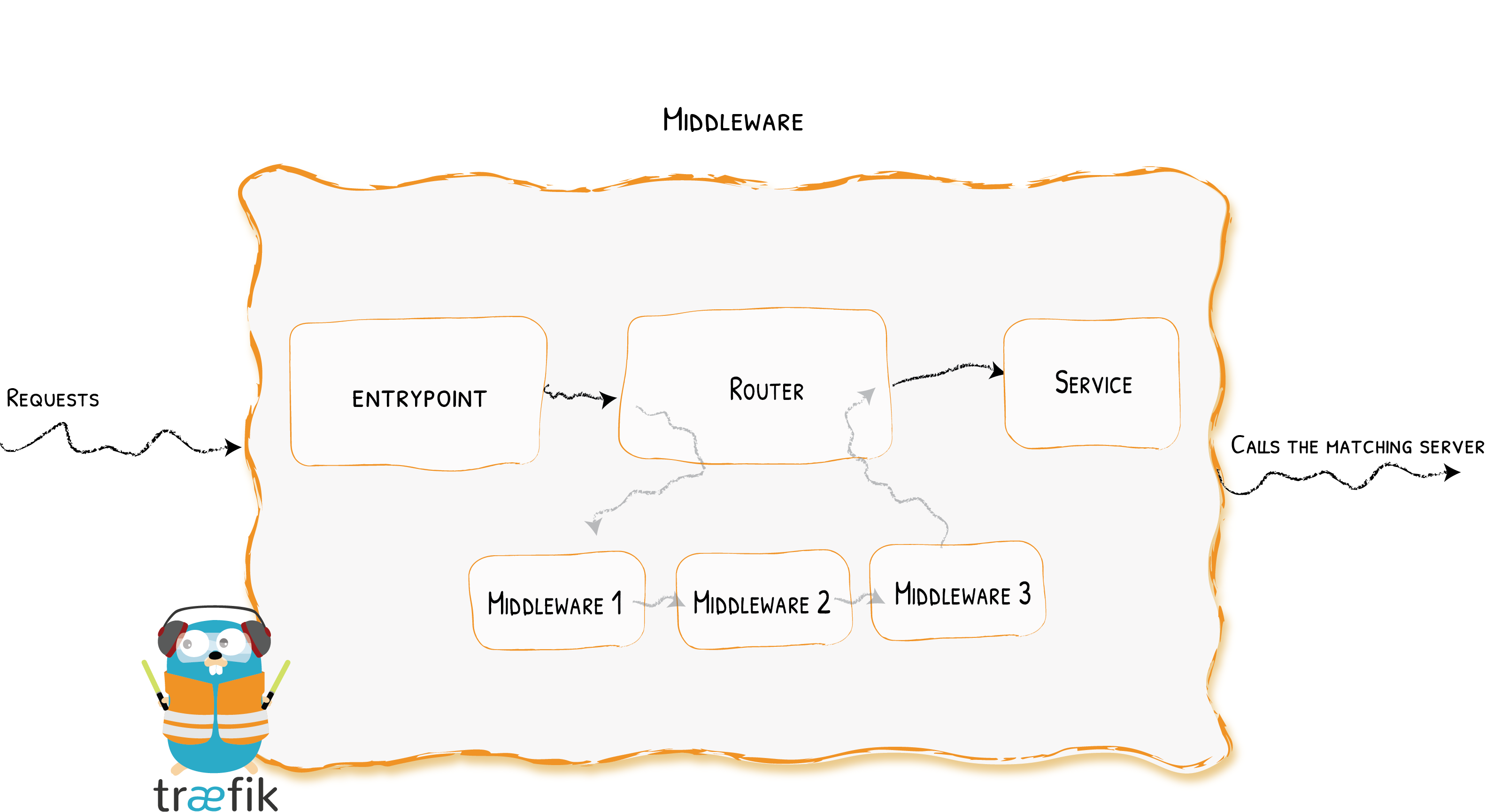
中间件附属在路由器上,是一种在请求发送到后端服务之前(或来自后端服务器的响应报文发送到客户端之前)调整请求的方法。
Traefik中有几种可用的中间件,一些可以修改请求,标头,一些负责重定向,一些添加身份验证,等等。多种中间件可以链式组合以适应各种情况。
# As YAML Configuration File
http:
  routers:
    router1:
      service: myService
      middlewares:
        - "foo-add-prefix"
      rule: "Host(`example.com`)"

  middlewares:
    foo-add-prefix:
      addPrefix:
        prefix: "/foo"

  services:
    service1:
      loadBalancer:
        servers:
          - url: "http://127.0.0.1:80"
# As a Kubernetes Traefik IngressRoute
apiVersion: apiextensions.k8s.io/v1beta1
kind: CustomResourceDefinition
metadata:
  name: middlewares.traefik.containo.us
spec:
  group: traefik.containo.us
  version: v1alpha1
  names:
    kind: Middleware
    plural: middlewares
    singular: middleware
  scope: Namespaced

---
apiVersion: traefik.containo.us/v1alpha1
kind: Middleware
metadata:
  name: stripprefix
spec:
  stripPrefix:
    prefixes:
      - /stripit

---
apiVersion: traefik.containo.us/v1alpha1
kind: IngressRoute
metadata:
  name: ingressroute
spec:
# more fields...
  routes:
    # more fields...
    middlewares:
      - name: stripprefix
| Middleware | Purpose | Area |
|---|---|---|
| AddPrefix | Add a Path Prefix | Path Modifier |
| BasicAuth | Basic auth mechanism | Security, Authentication |
| Buffering | Buffers the request/response | Request Lifecycle |
| Chain | Combine multiple pieces of middleware | Middleware tool |
| CircuitBreaker | Stop calling unhealthy services | Request Lifecycle |
| Compress | Compress the response | Content Modifier |
| DigestAuth | Adds Digest Authentication | Security, Authentication |
| Errors | Define custom error pages | Request Lifecycle |
| ForwardAuth | Authentication delegation | Security, Authentication |
| Headers | Add / Update headers | Security |
| IPWhiteList | Limit the allowed client IPs | Security, Request lifecycle |
| InFlightReq | Limit the number of simultaneous connections | Security, Request lifecycle |
| PassTLSClientCert | Adding Client Certificates in a Header | Security |
| RateLimit | Limit the call frequency | Security, Request lifecycle |
| RedirectScheme | Redirect easily the client elsewhere | Request lifecycle |
| RedirectRegex | Redirect the client elsewhere | Request lifecycle |
| ReplacePath | Change the path of the request | Path Modifier |
| ReplacePathRegex | Change the path of the request | Path Modifier |
| Retry | Automatically retry the request in case of errors | Request lifecycle |
| StripPrefix | Change the path of the request | Path Modifier |
| StripPrefixRegex | Change the path of the request | Path Modifier |
traefik中定义的几个概念(逻辑对象)
routers(http/tcp/udp)
services(http/tcp/udp)
middlewares
serversTransports
tls.certificates
tls.options
tls.stores
此外,在静态配置中还有一个对象:
- entrypoint
| Kind | 功能 | 对应概念 |
|---|---|---|
| IngressRoute | HTTP Routing | HTTP router |
| Middleware | 调整报文 | HTTP Middlewares |
| TraefikService | 对HTTP loadbalancing/mirroring的封装 | HTTP service |
| IngressRouteTCP | TCP Routing | TCP router |
| IngressRouteUDP | UDP Routing | UDP router |
| TLSOptions | 对https连接的参数进行配置 | TLSOptions |
| TLSStores | 进行配置默认的TLS store | TLSStores |
| ServersTransport | 配置tresfik向后端server转发报文的参数 | ServersTransport |