
02 Ceph集群运维
ceph守护进程的管理分为3个层级:全局级别、分类级别、进程级别。
使用ceph.target可以实现对当前node上所有的ceph进程进行管理操作,无论是monitor、mds等等哪种类型(TYPE)的进程。
sudo systemctl restart ceph.target #会重启当前节点ceph所有相关的进程
对当前主机上同一个类别的所有进程进行管理。
sudo systemctl start ceph-osd.target  # 启动当前节点上所有的ceph-osd这类进程
sudo systemctl start ceph-mon.target
sudo systemctl start ceph-mds.target
对某一个实例进行管理。
sudo systemctl start ceph-osd@{id}  # 启动当前节点上的某一个进程。例如ceph-osd@1
sudo systemctl start ceph-mon@{hostname} #对于mon和mds,其{id}就是{hostname}
sudo systemctl start ceph-mds@{hostname}
ceph的日志目录为/var/log/ceph/
[cephadm@node-1 ceph-cluster]$ sudo ls -l /var/log/ceph/
total 13588
-rw-------. 1 ceph ceph    8355 Apr 10 14:48 ceph.audit.log
-rw-------. 1 ceph ceph   13369 Apr  9 11:21 ceph.audit.log-20210410.gz
-rw-r--r--. 1 root ceph     312 Apr 10 11:10 ceph-client.admin.log
-rw-r--r--. 1 ceph ceph    5471 Apr 10 11:03 ceph-client.rgw.node-1.log
-rw-------. 1 ceph ceph 3637050 Apr 10 15:05 ceph.log
-rw-------. 1 ceph ceph  947125 Apr 10 03:20 ceph.log-20210410.gz
-rw-r--r--. 1 ceph ceph     587 Apr 10 10:36 ceph-mds.node-1.log
-rw-r--r--. 1 ceph ceph 3573149 Apr 10 15:05 ceph-mgr.node-1.log
-rw-r--r--. 1 ceph ceph  568594 Apr 10 03:21 ceph-mgr.node-1.log-20210410.gz
-rw-r--r--. 1 ceph ceph 3337254 Apr 10 15:05 ceph-mon.node-1.log
-rw-r--r--. 1 ceph ceph  814800 Apr 10 03:20 ceph-mon.node-1.log-20210410.gz
-rw-r--r--. 1 ceph ceph  436379 Apr 10 15:01 ceph-osd.0.log
-rw-r--r--. 1 ceph ceph   51396 Apr 10 03:11 ceph-osd.0.log-20210410.gz
-rw-r--r--. 1 ceph ceph  408154 Apr 10 15:05 ceph-osd.5.log
-rw-r--r--. 1 ceph ceph   49747 Apr 10 03:15 ceph-osd.5.log-20210410.gz
-rw-r--r--. 1 root ceph       0 Apr 10 03:21 ceph-volume.log
-rw-r--r--. 1 root ceph    5017 Apr  8 15:25 ceph-volume.log-20210410.gz
# 查看ceph状态
ceph -s  #或 ceph status

# watch集群状态
ceph -w

# 集群使用情况
ceph df

# osd状态
ceph osd stat
ceph osd dump  #详情
ceph osd tree
ceph osd df

# monitor状态
ceph mon stat
ceph mon dump
ceph quorum_status

# mds状态
ceph mds stat
ceph fs dump


# admin socket操作,socket文件位于/var/run/ceph目录下,可以进行参数的查看和配置
#ceph daemon {daemon-name}
#ceph daemon {path-to-socket-file}
ceph daemon osd.0 foo
ceph daemon /var/run/ceph/ceph-osd.0.asok foo
#ceph daemon {daemon-name} help
ceph daemon mon.node-1 help
资源池可以提供如下配置能力:
- Resilience:弹性副本数。可以设置允许多少OSD发生故障而又不会丢失数据(例如,size = 2)。
- PG:可以设置Pool的PG数量。一个典型的配置每个OSD使用大约100个放置组,以提供最佳的平衡,而不会消耗太多的计算资源。
- CRUSH Rules:当您将数据存储在Pool时,对象及其副本在群集中的位置由CRUSH规则控制。
- Snapshots:
# 查看pool列表
ceph osd lspools

#创建pool
ceph osd pool create {pool-name} {pg-num} [{pgp-num}] [replicated] \
     [crush-rule-name] [expected-num-objects]

ceph osd pool create {pool-name} {pg-num}  {pgp-num}   erasure \
     [erasure-code-profile] [crush-rule-name] [expected_num_objects]

# 查看pool参数
ceph osd pool get {pool-name} {key}

# 设置pool参数
ceph osd pool set {pool-name} {key} {value}

# 将pool关联到某一类应用程序,指定pool的使用用途分类,应用名称分为:cephfs\rbd\rgw
ceph osd pool application enable {pool-name} {application-name}

# 设置pool配额
#ceph osd pool set-quota {pool-name} [max_objects {obj-count}] [max_bytes {bytes}]
ceph osd pool set-quota pool-data max_objects 10000  #如果要移除配额,将值设置为0
osd pool get-quota pool-data

# 删除pool。
#要删除池,必须在Monitor的配置中将mon_allow_pool_delete标志设置为true。否则,他们将拒绝删除池。
ceph osd pool delete {pool-name} [{pool-name} --yes-i-really-really-mean-it]

# 重命名pool
ceph osd pool rename {current-pool-name} {new-pool-name}

# 查看pool的统计信息
rados df
ceph osd pool stats [{pool-name}]

# 对pool做快照
ceph osd pool mksnap {pool-name} {snap-name}
# 删除pool快照
ceph osd pool rmsnap {pool-name} {snap-name}
ceph相关命令及其多。运维过程中可以借助help命令配合grep来查询。
- ceph -h
- rados -h
- rbd -h
[cephadm@node-1 ceph-cluster]# ceph -h |grep quota
osd pool get-quota <poolname>                                           obtain object or byte limits for pool
osd pool set-quota <poolname> max_objects|max_bytes <val>               set object or byte limit on pool
放置组(PG)是Ceph分发数据的内部实现细节。PG是组织多个对象在一起的一个逻辑概念。通过PG可以将多个对象作为一个整体进行调度和计算位置,减轻客户端计算压力。
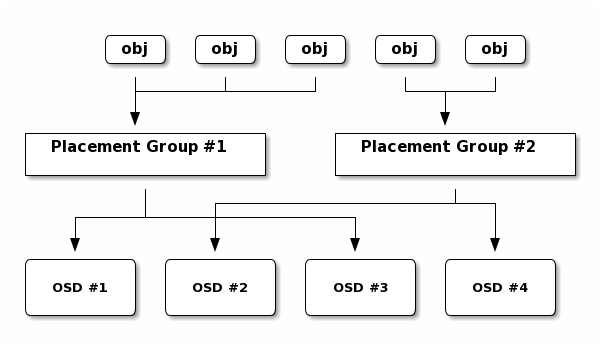
对于ceph中多个池中设置pg数量,可以使用计算器进行。https://ceph.com/pgcalc/
以删除pool为例讲解ceph参数调整。
[cephadm@node-1 ceph-cluster]$ ceph osd pool ls
mypool
pool-demo
pool-demo2
.rgw.root
default.rgw.control
default.rgw.meta
default.rgw.log
cephfs_metadata
cephfs_data

# 删除mypool
[cephadm@node-1 ceph-cluster]$ ceph osd pool delete mypool
Error EPERM: WARNING: this will *PERMANENTLY DESTROY* all data stored in pool mypool.  If you are *ABSOLUTELY CERTAIN* that is what you want, pass the pool name *twice*, followed by --yes-i-really-really-mean-it.
# 要求必须添加--yes-i-really-really-mean-it参数


[cephadm@node-1 ceph-cluster]$ ceph osd pool delete mypool mypool --yes-i-really-really-mean-it
Error EPERM: pool deletion is disabled; you must first set the mon_allow_pool_delete config option to true before you can destroy a pool
# 要求启用mon_allow_pool_delete这个参数,我们先查看当前的值是什么。

[cephadm@node-1 ceph-cluster]$ sudo ceph --admin-daemon /var/run/ceph/ceph-mon.node-1.asok config show |grep mon_allow_pool_delete
    "mon_allow_pool_delete": "false",
# 该值为false,我们需要修改该值为true
# 以上命令等同于ceph daemon mon.node-1 config show|grep mon_allow_pool_delete
需要在所有的monitor节点进行修改。
#每个monitor节点依次执行
[cephadm@node-1 ceph-cluster]$ sudo ceph --admin-daemon /var/run/ceph/ceph-mon.node-1.asok config set mon_allow_pool_delete true
{
    "success": "mon_allow_pool_delete = 'true' "
}

[cephadm@node-1 ceph-cluster]$ sudo ceph --admin-daemon /var/run/ceph/ceph-mon.node-1.asok config show |grep mon_allow_pool_delete
    "mon_allow_pool_delete": "true",
# 1、修改ceph.conf文件,在global下添加"mon_allow_pool_delete = true"
[cephadm@node-1 ceph-cluster]$ cat ceph.conf
[global]
fsid = 9ebc9b51-1406-43cc-bdd2-d560e58d842f
public_network = 64.115.3.0/24
mon_initial_members = node-1, node-2, node-3
mon_host = 64.115.3.101,64.115.3.102,64.115.3.103
auth_cluster_required = cephx
auth_service_required = cephx
auth_client_required = cephx
mon_allow_pool_delete = true  # 添加此行

[client.rgw.node-1]
rgw_frontends = "civetweb port=80"


# 2、分发该配置文件到所有的monitor节点
[cephadm@node-1 ceph-cluster]$ ceph-deploy --overwrite-conf config push node-1 node-2 node-3

# 3、依次到node-1 node-2 node-3节点上重启monitor服务
[cephadm@node-1 ceph-cluster]$ sudo systemctl restart ceph-mon@node-1
修改参数后,再进行删除pool:
[cephadm@node-1 ceph-cluster]$ ceph osd pool delete mypool mypool --yes-i-really-really-mean-it
pool 'mypool' removed
CRASH 归档:https://blog.csdn.net/lyf0327/article/details/103315698/