
03 Es搜索语法
# 查询所有的索引
GET _cat/indices
# 查询所有的索引(带标题栏)
GET _cat/indices?v


# 查询movies的所有数据
GET movies/_search

# 查询movies的记录数量
GET movies/_count

# 查询id为24的数据
GET movies/_doc/24

# 查询id为24的数据,并指定返回的属性
GET movies/_doc/24?_source=filed1,filed2
# 添加id为1的文档;如果没有指定id,则ES会自动生成一个hash字符串作为id
POST user/_doc/1
{
  "firstname": "san",
  "lastname": "zhang"
}


# 创建或者覆盖文档,同POST
PUT user/_doc/2
{
  "firstname": "si",
  "lastname": "li"
}
**ES内部进行更新文档(全量更新/覆盖)的机制:**会将原来的doc标记为delete,然后使用新的doc进行创建。
# 创建id为2的文档,如果索引中已存在相同id,会报错;
POST user/_create/2
{
  "firstname": "si",
  "lastname": "li"
}

# 创建id为5的文档,如果已存在就报错,如果不存在就创建,同POST
PUT user/_create/5
{
  "firstname": "ljzu",
  "lastname": "sdut"
}
partial update:部分更新,只更新部分属性字段。不会覆盖整条document。
# 在id位2的文档中添加一个age属性,修改结构
POST user/_update/2
{
  "doc": {
    "age": 20
  }
}
**ES内部partial update机制:**ES内部先读取老的doc,然后将partial update应用到老的doc之上,形成新的doc。之后,便会加老的doc标记为删除,并使用新的doc进行创建。
此外,更新文档还可以使用script。Elasticsearch7.X Scripting脚本使用详解
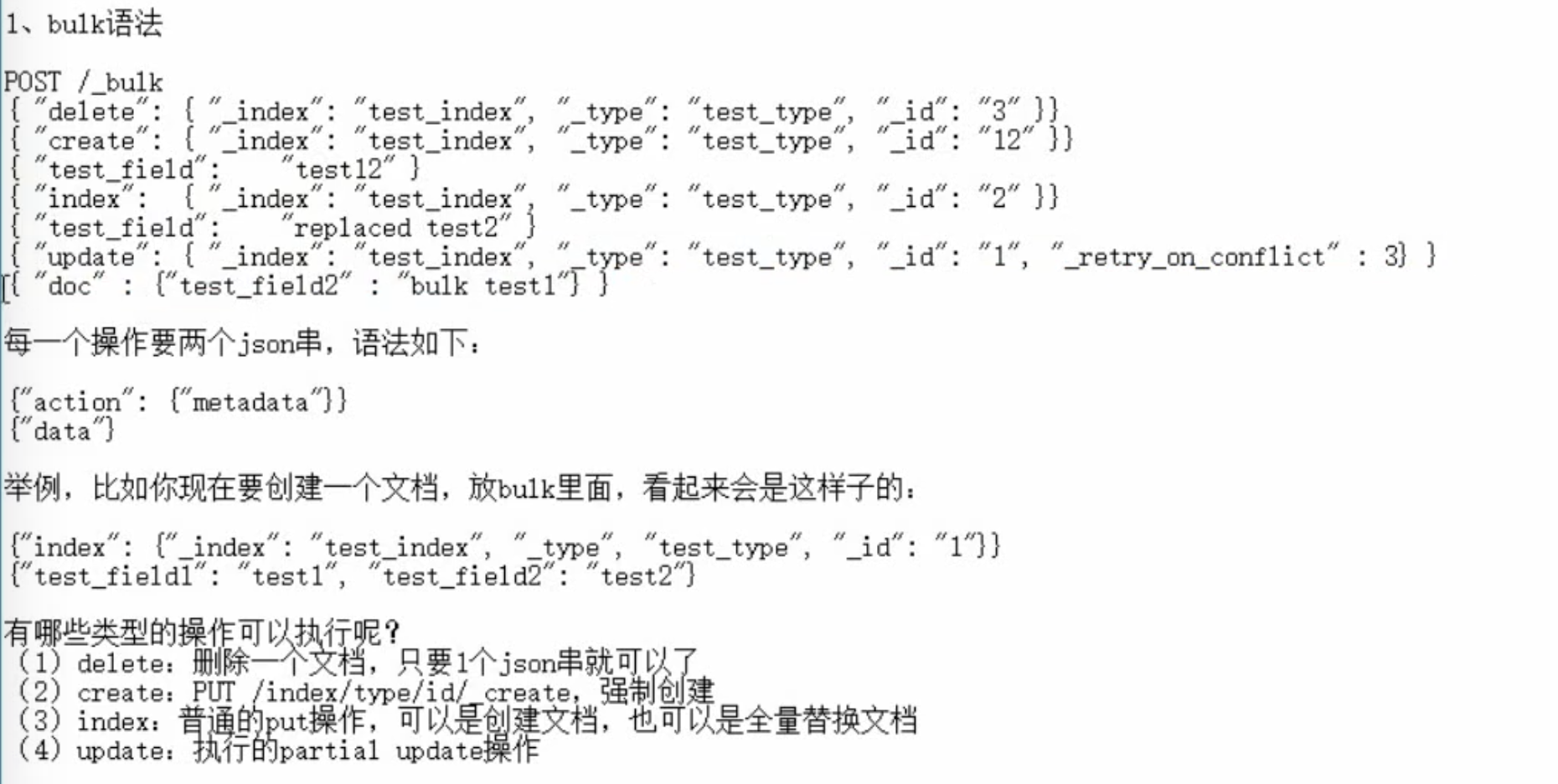
_bulk的每个操作需要2个json字符串(delete操作只需要1个json字符串)。而且每一个json字符串不能换行,多个json之间必须换行。
批量操作时,如果其中一个操作失败,不会影响其他的操作,会继续进行。
# 批量插入数据
POST user/_bulk
{"index": {"_id": 3}}
{ "firstname": "wu","lastname": "wang"}
{"index": {}}
{ "firstname": "liu","lastname": "zhao"}
{"index": {"_id": 4}}
{ "firstname": "juzhang","lastname": "li"}

#多个索引的批量插入
POST _bulk
{ "index" : { "_index" : "student1", "_id" : "1" } }
{ "name" : "张三" }
{ "index" : { "_index" : "student2", "_id" : "2" } }
{ "name" : "李四", "age": 10 }
{ "index" : { "_index" : "student3", "_id" : "3" } }
{ "name" : "王五", "age": 11 }
_bulk也支持 delete、update 等操作,默认操作为index操作(创建或覆盖)。详情
POST _bulk
{ "index" : { "_index" : "test", "_id" : "1" } }
{ "field1" : "value1" }
{ "delete" : { "_index" : "test", "_id" : "2" } }
{ "create" : { "_index" : "test", "_id" : "3" } }
{ "field1" : "value3" }
{ "update" : {"_id" : "1", "_index" : "test"} }
{ "doc" : {"field2" : "value2"} }
# 批量查询多个指定的id的数据
GET _mget
{
  "docs":[
    {"_index": "user","_id": 1},
    {"_index": "user","_id": 2}
  ]
}

# 如果是一个索引中的mget:
GET user/_mget
{
  "docs": [
    {"_id": 1},
    {"_id": 2}
  ]
}
# 等同于
GET /user/_mget
{
  "ids": [1,2]
}
mget可以将多次查询,合并到一次查询中,减少网络开销。
# 删除索引movies
DELETE movies
# 删除id为2的文档
DELETE user/_doc/2
告诉你如何一次性搜索多个index下的数据,(对于老版本,还支持多个type同时搜索)
/_search:所有索引,所有type下的所有数据都搜索出来
/index1/_search:指定一个index,搜索其下所有type的数据
/index1,index2/_search:同时搜索两个index下的数据
/*1,*2/_search:按照通配符去匹配多个索引
/_all/_search:搜索所有索引的所有数据
# 创建索引的语法
PUT /my_index
{
    "settings": { ... any settings ... },
    "mappings": {
        "type_one": { ... any mappings ... },
        "type_two": { ... any mappings ... },
        ...
    }
}

# 创建索引的示例
PUT /my_index
{
  "settings": {
    "number_of_shards": 1,
    "number_of_replicas": 0
  },
  "mappings": {
    "my_type": {
      "properties": {
        "my_field": {
          "type": "text"
        }
      }
    }
  }
}

#修改索引副本数量(number_of_shards是无法修改的)
PUT /my_index/_settings
{
    "number_of_replicas": 1
}
搜索的内容在文档的任何一个属性(field)出现即可。不指定字段名。
# 查询所有的属性中只要包含2012的所有的数据(任何一个filed存在即可)
GET movies/_search?q=2012
泛查询时,会使用
_all属性进行搜索。
# 查询title中包含2012的数据
GET movies/_search?q=title:2012

#此外,查询字符串还可以使用加号和减号
# +:是默认的,缺省就是+,表示包含;
# -:表示不能包含
GET movies/_search?q=title:+2012

GET movies/_search?q=-title:2012
GET movies/_search?q=title:(-2012)
# 查询title中包含2012,从第10条开始,查询8条数据
GET movies/_search?q=title:2012&from=10&size=8
from取值从0开始。
# 查询title中‘包含Beautiful或者Mind’的所有的数据
GET movies/_search?q=title:Beautiful Mind
# 或
GET movies/_search?q=title:(Beautiful Mind)
# 或
GET movies/_search?q=title:(Beautiful OR Mind)

# 查询title中包含 "Beautiful Mind"这个短语的所有的数据
GET movies/_search?q=title:"Beautiful Mind"

#查询title中既包含Mind又包含Beautiful的所有的数据,与顺序没有关系;AND必须为大写。
GET movies/_search?q=title:(Beautiful AND Mind)

# 查询title中既包含Mind但不包含Beautiful的所有的数据
GET movies/_search?q=title:(Beautiful NOT Mind)
# 或
GET movies/_search?q=title:(Beautiful -Mind)
# 查询title中包含Beautiful且电影上映时间在2012年之后的所有的数据
GET movies/_search?q=title:Beautiful AND year:2012
# 查询title中包含Beautiful且电影上映时间在1900年之后的所有的数据
GET movies/_search?q=title:Beautiful AND year:>=1900
# 加上分页
GET movies/_search?q=(title:Beautiful AND year:>=1900)&from=10&size=10
# 查询2018年之后上映的电影
GET movies/_search?q=year:>=2018
# 查询在2012到2017年上映的电影
GET movies/_search?q=year:(>=2012 AND <=2017)
# 区间:{]或[],必须以 ] 结尾。
#{表示‘>’;[表示‘≥’;]表示‘≤’
GET movies/_search?q=year:{2012 TO 2017]
# ?:一个任意字符;*:任意个任意字符
GET movies/_search?q=title:Min?
GET movies/_search?q=title:Min*
问题:http协议中get是否可以带上request body?
HTTP协议,一般不允许get请求带上request body,但是因为get更加适合描述查询数据的操作,因此ES还是这么用了
碰巧,很多浏览器,或者是服务器,也都支持GET+request body模式
如果遇到不支持的场景,也可以用POST /_search。
GET /_search?from=0&size=10

POST /_search
{
  "from":0,
  "size":10
}
以下所有的查询,都是在body中使用”query“关键字。
- term:在查询的时候,不对指定的查询内容进行分词处理,会直接原封不动的拿着查询内容去倒排索引中查询。这里的原封不动包括查询内容的大小写。
- match:在查询的时候使用分析器对指定的查询内容进行分词。
- constant_score:不会对结果进行计算得分,提高查询效率。
分词(analysis)
除了在数据写入的时候,ES会对写入的数据进行分词处理,还会在在查询的时候也可以使用分析器对查询语句进行分词。
不同的分词器有不同的行为,默认的anaylzer是由三部分操作组成,例如有 Hello a World, the world is beautifu :
- Character Filter: 将文本中html标签剔除掉。
- Tokenizer: 按照规则进行分词,在英文中按照空格分词。
- Token Filter: 去掉stop world(停顿词,a, an, the, is, are等),然后转换小写
在ES中,term查询不会对输入进行分词处理,将输入作为一个整体,在倒排索引中查找准确的词项。
# 查询电影名字中包含有 beautiful 这个单词的所有的电影,用于查询的单词不会进行分词的处理
GET movies/_search
{
  "query": {
    "term": {
      "title": {
        "value": "beautiful"
      }
    }
  }
}

# 注意以下查询不会有结果
GET movies/_search
{
  "query": {
    "term": {
      "title": {
        "value": "beautiful mind"
      }
    }
  }
}
# 查询电影名字中包含有 beautiful 或者 mind 这两个单词的所有的电影,用于查询的单词不会进行分词的处理
GET movies/_search
{
  "query": {
    "terms": {
      "title": [
        "beautiful",
        "mind"
      ]
    }
  }
}
constant_score-filter 进行查询,不对结果进行算分,降低查询代价,而且还查询的数据进行缓存,提高再次效率。
使用Constant Score将查询转换为一个filter,避免算分,利用缓存,提高查询的效率。(在query中直接使用filter是不支持的,需要结合constant_score一起使用)
#查询title中包含有beautiful的所有的电影,不进行相关性算分,查询的数据进行缓存,提高效率
GET movies/_search
{
  "query": {
    "constant_score": {
      "filter": {
        "term": {
          "title": "beautiful"
        }
      }
    }
  }
}
索引和搜索的时候都会进行分词,在查询的时候,会对输入进行分词,然后每个词项会逐个到底层进行查询,将最终的结果进行合并。
# 查询电影名字title中包含有beautiful的所有电影
GET movies/_search
{
  "query": {
    "match": {
      "title": "beautiful"
    }
  }
}
匹配一个短语,可以不准确的理解为:将输入的短语作为一个整体在倒排索引中进行查找。
match_pharse与term查询不同的是:match_pharse也是需要分词的,而term不能对query-string进行分词。
# 查询电影名字中包含有 "beautiful mind" 这个短语的所有的数据
GET movies/_search
{
  "query": {
    "match_phrase": {
      "title": "beautiful mind"
    }
  }
}
实际的查询过程:match_phrase查询分析文本并根据分析的文本创建一个短语查询。match_phrase 会将检索关键词分词,分词操作与match基本一致。match_phrase的分词结果必须在被检索字段的分词中都包含,而且顺序必须相同,而且默认必须都是连续的。官方文档
当一个字符串被分析时,分析器不仅只返回一个词条列表,它同时也返回原始字符串的每个词条的位置、或者顺序信息:
GET /_analyze?analyzer=standard
Quick brown fox
返回如下:
{
   "tokens": [
      {
         "token": "quick",
         "start_offset": 0,
         "end_offset": 5,
         "type": "<ALPHANUM>",
         "position": 1
      },
      {
         "token": "brown",
         "start_offset": 6,
         "end_offset": 11,
         "type": "<ALPHANUM>",
         "position": 2
      },
      {
         "token": "fox",
         "start_offset": 12,
         "end_offset": 15,
         "type": "<ALPHANUM>",
         "position": 3
      }
   ]
}
位置信息可以被保存在倒排索引(Inverted Index)中,像match_phrase这样位置感知(Position-aware)的查询能够使用位置信息来匹配那些含有正确单词出现顺序的文档,且在这些单词之间没有插入别的单词。
对于匹配了短语"quick brown fox"的文档,下面的条件必须为true:
- quick、brown和fox必须全部出现在某个字段中。
- brown的位置必须比quick的位置大1。
- fox的位置必须比quick的位置大2。
如果以上的任何一个条件没有被满足,那么文档就不能被匹配。
在多个字段中查询。
# 查询 title 或 genre 中包含有 beautiful 或者 Adventure 的所有的数据
GET movies/_search
{
  "query": {
    "multi_match": {
      "query": "beautiful Adventure",
      "fields": ["title","genre"]
    }
  }
}
查询全部记录
#查询索引中的所有的数据
GET movies/_search
{
  "query": {
    "match_all": {}
  }
}
# 等同于
GET movies/_search
query_string:在搜索框中输入的文本
可以对查询字符串使用AND、OR等逻辑操作符,default_operator为"OR"。
类似于URI查询。
# 查询 title 中包含有 beautiful 和 mind 的所有的电影
GET movies/_search
{
  "query": {
    "query_string": {
      "default_field": "title",
      "query": "mind AND beautiful"
    }
  }
}
# 等同于
GET movies/_search
{
  "query": {
    "query_string": {
      "default_field": "title",
      "query": "mind beautiful",
      "default_operator": "AND"
    }
  }
}
可以简单地实现对搜索文本的“与”、“或”、“非”操作。
# “逻辑或”操作(默认)
# 查询 title 中包含有 beautiful 或 mind 的所有的电影
GET movies/_search
{
  "query": {
    "simple_query_string": {
      "query": "beautiful mind",
      "fields": ["title"]
    }
  }
}
#等同于
GET movies/_search
{
  "query": {
    "simple_query_string": {
      "query": "beautiful | mind",
      "fields": ["title"]
    }
  }
}
#等同于
GET movies/_search
{
  "query": {
    "simple_query_string": {
      "query": "beautiful mind",
      "fields": ["title"],
      "default_operator": "OR"
    }
  }
}
# “逻辑与”操作
# 查询 title 中包含有 beautiful 和 mind 的所有的电影
GET movies/_search
{
  "query": {
    "simple_query_string": {
      "query": "beautiful + mind",
      "fields": ["title"]
    }
  }
}
# 等同于
GET movies/_search
{
  "query": {
    "simple_query_string": {
      "query": "beautiful mind",
      "fields": ["title"],
      "default_operator": "AND"
    }
  }
}
# “逻辑非”操作
# 查询 title 中包含 beautiful 和 people 但是不包含 Animals 的所有的数据
#注意:“-”与查询单词紧挨着,是单目运算符;“+”在此处是双目运算符,表示逻辑与。
GET movies/_search
{
  "query": {
    "simple_query_string": {
      "query": "beautiful + people + -Animals",
      "fields": ["title"]
    }
  }
}
#短语匹配
# 查询title中包含 "beautiful mind" 这个短语的所有的电影 (用法和match_phrase类似)
GET movies/_search
{
  "query": {
    "simple_query_string": {
      "query": "\"beautiful mind\"",
      "fields": ["title"]
    }
  }
}

# 查询title中包含 “beautiful mind” 或者 "Modern Romance" 这两个短语的所有的电影
GET movies/_search
{
  "query": {
    "simple_query_string": {
      "query": "\"beautiful mind\" \"Modern Romance\"",
      "fields": ["title"]
    }
  }
}
#等同于
GET movies/_search
{
  "query": {
    "simple_query_string": {
      "query": "\"beautiful mind\" | \"Modern Romance\"",
      "fields": ["title"]
    }
  }
}
#多属性查询
# 查询title或genre中包含有 beautiful mind romance 这个三个单词的所有的电影 (与 multi_match类似)
GET movies/_search
{
  "query": {
    "simple_query_string": {
      "query": "beautiful mind romance",
      "fields": ["title","genre"]
    }
  }
}
其他示例:
# 查询title或者genre中包含有 beautiful + mind 这个两个词,或者Comedy + Romance + Musical + Drama + Children 这个五个词的所有的数据
GET movies/_search
{
  "query": {
    "simple_query_string": {
      "query": "(beautiful + mind)|(Comedy + Romance + Musical + Drama + Children)",
      "fields": ["title","genre"]
    }
  }
}
#等同于
GET movies/_search
{
  "query": {
    "simple_query_string": {
      "query": "(beautiful + mind) (Comedy + Romance + Musical + Drama + Children)",
      "fields": ["title","genre"]
    }
  }
}
# 查询上映在2016到2018年的所有的电影
GET movies/_search
{
  "query": {
    "range": {
      "year": {
        "gte": 2016,
        "lte": 2018
      }
    }
  }
}
range也可以在bool查询中与filter一起使用。
模糊查询可以对输入的查询字符串进行纠正,然后使用纠正后的词语进行查询。fuzziness表示纠正次数,可以取值为:0,1,2。
#查询title中从第6个字母开始只要最多纠正一次,就与 neverendign 匹配的所有的数据
GET movies/_search
{
  "query": {
    "fuzzy": {
      "title": {
        "value": "neverendign",
        "fuzziness": 1,
        "prefix_length": 5
      }
    }
  }
}
Request Body查询中,只能存在一个query关键字,而且query下只能有一种查询方式。如果要使用多个查询条件,就需要使用bool。
bool查询有如下几种模式:
- must:必须满足的条件
- must_not:不能满足的条件。(该条件不会计算得分)
- should:满足条件之一即可。
- filter:类似于must,但不会对查询结果进行算分,性能较好。
以上几种模式可以在同一个query中同时使用。
# 查询title中包含有beautiful或者mind单词,并且上映时间在2016~2018年的所有的电影
GET movies/_search
{
  "query": {
    "bool": {
      "must": [
        {
          "match": {
            "title": "beautiful mind"
          }
        },
        {
          "range": {
            "year": {
              "gte": 2016,
              "lte": 2018
            }
          }
        }
      ]
    }
  }
}
# 查询title中包含有beautiful或者mind单词,但不包含“story”单词,并且上映时间在2016~2018年的所有的电影
GET movies/_search
{
  "query": {
    "bool": {
      "must": [
        {
          "match": {
            "title": "beautiful mind"
          }
        },
        {
          "range": {
            "year": {
              "gte": 1990,
              "lte": 1992
            }
          }
        }
      ],
      "must_not": [
        {"match": {
          "title": "story"
        }}
      ]
    }
  }
}
filter不会进行相关性的算分,并且会将查出来的结果进行缓存,效率上比 query 高。
# 查询 title 中包含有 beautiful这个单词,并且上映年份在2016~2018年间的所有电影,但是不进行相关性的算分
GET movies/_search
{
  "query": {
    "bool": {
      "filter": [
        {
          "term": {
            "title": "beautiful"
          }
        },
        {
          "range": {
            "year": {
              "gte": 2016,
              "lte": 2018
            }
          }
        }
      ]
    }
  }
}
一般来说,在进行搜索时,需要将最匹配搜索条件的数据先返回,那么用query;如果你只是要根据一些条件筛选出一部分数据,不关注其排序,那么用filter。
除了query操作,还有一些其他的操作。
先进行query,然后再对查询结果进行sort排序。
# 查询上映在2016到2018年的所有的电影,再根据上映时间的倒序进行排序
GET movies/_search
{
  "query": {
    "range": {
      "year": {
        "gte": 2016,
        "lte": 2018
      }
    }
  },
  "sort": [
    {
      "year": {
        "order": "desc"
      }
    }
  ]
}
如何对string类型的field进行排序?
如果对一个string field进行排序,结果往往不准确的,因为分词后是多个单词,再排序就不是我们想要的结果了。通常解决方案是,将一个string field建立两次索引,一个分词,用来进行搜索;一个不分词 (“type” : “keyword”),用来进行排序。这个行为也是dynamic mapping的一个默认行为了。
        "name" : {
          "type" : "text",
          "fields" : {
            "keyword" : {
              "type" : "keyword",
              "ignore_above" : 256
            }
          }
        }
使用_source完成投影操作。
# 查询电影名字中包含有 beautiful 或者 mind 的所有的数据,但是只查询title和id两个属性
GET movies/_search
{
  "query": {
    "match": {
      "title": "beautiful mind"
    }
  },
  "_source": [
    "title",
    "id"
  ]
}
分页使用from+size实现
# 查询电影名字title中包含有beautiful的所有电影,每页十条,取第二页的数据
GET movies/_search
{
  "query": {
    "match": {
      "title": "beautiful"
    }
  },
  "from": 10,
  "size": 10
}
准备试验数据
# 创建mapping
PUT employee
{
  "mappings": {
    "properties": {
      "id": {
        "type": "integer"
      },
      "name": {
        "type": "keyword"
      },
      "job": {
        "type": "keyword"
      },
      "age": {
        "type": "integer"
      },
      "gender": {
        "type": "keyword"
      }
    }
  }
}

# 导入数据
PUT employee/_bulk
{"index":{"_id":1}}
{"id":1,"name":"Bob","job":"java","age":21,"sal":8000,"gender":"female"}
{"index":{"_id":2}}
{"id":2,"name":"Rod","job":"html","age":31,"sal":18000,"gender":"female"}
{"index":{"_id":3}}
{"id":3,"name":"Gaving","job":"java","age":24,"sal":12000,"gender":"male"}
{"index":{"_id":4}}
{"id":4,"name":"King","job":"dba","age":26,"sal":15000,"gender":"female"}
{"index":{"_id":5}}
{"id":5,"name":"Jonhson","job":"dba","age":29,"sal":16000,"gender":"male"}
{"index":{"_id":6}}
{"id":6,"name":"Douge","job":"java","age":41,"sal":20000,"gender":"female"}
{"index":{"_id":7}}
{"id":7,"name":"cutting","job":"dba","age":27,"sal":7000,"gender":"male"}
{"index":{"_id":8}}
{"id":8,"name":"Bona","job":"html","age":22,"sal":14000,"gender":"female"}
{"index":{"_id":9}}
{"id":9,"name":"Shyon","job":"dba","age":20,"sal":19000,"gender":"female"}
{"index":{"_id":10}}
{"id":10,"name":"James","job":"html","age":18,"sal":22000,"gender":"male"}
{"index":{"_id":11}}
{"id":11,"name":"Golsling","job":"java","age":32,"sal":23000,"gender":"female"}
{"index":{"_id":12}}
{"id":12,"name":"Lily","job":"java","age":24,"sal":2000,"gender":"male"}
{"index":{"_id":13}}
{"id":13,"name":"Jack","job":"html","age":23,"sal":3000,"gender":"female"}
{"index":{"_id":14}}
{"id":14,"name":"Rose","job":"java","age":36,"sal":6000,"gender":"female"}
{"index":{"_id":15}}
{"id":15,"name":"Will","job":"dba","age":38,"sal":4500,"gender":"male"}
{"index":{"_id":16}}
{"id":16,"name":"smith","job":"java","age":32,"sal":23000,"gender":"male"}
GET indexName/_search
{
    "aggs": {  # aggs为关键字
        "AGGS_NAME": { #聚合分析的名字是由用户自定义的
            "AGG_TYPE": {  #具体的聚合类型,例如:sum、avg、max、min、top_hits、cardinality...
                 // aggregation body
             }
         },
         ...... # 可以有多项聚合搜索操作
    }
}
- 单值输出:ES中大多数的数学计算只输出一个值,如:min、max、sum、avg、cardinality
- 多值输出:ES 还有一些函数可以一次性输出多个统计的数据 : terms stats
求和
# 查询工资的总和
GET employee/_search
{
  "aggs": {
    "other_info": {
      "sum": {
        "field": "sal"
      }
    }
  },
  "size": 0
}
#查询员工的平均工资
GET employee/_search
{
  "size": 0,
  "aggs": {
    "avg_sales": {
      "avg": {
        "field": "sal"
      }
    }
  }
}
类似于MySQL中的count(*)
#查询总共有多少个岗位, cardinality的值类似于sql中的 count distinct,即去重统计总数
GET employee/_search
{
  "size": 0,
  "aggs": {
    "job_count_info": {
      "cardinality": {
        "field": "job"
      }
    }
  }
}
一个aggs下可以进行多个agg操作:
# 查询工资的最高值、平均值、最低值
GET employee/_search
{
  "size": 0,
  "aggs": {
    "max_sal": {
      "max": {
        "field": "sal"
      }
    },
    "min_sal": {
      "min": {
        "field": "sal"
      }
    },
    "avg_sal": {
      "avg": {
        "field": "sal"
      }
    }
  }
}

# 求工资统计信心和工种数量的信息
GET employee/_search
{
  "size": 0,
  "aggs": {
    "job_info": {
      "terms": {
        "field": "job"
      }
    },
    "sal_info": {
      "stats": {
        "field": "sal"
      }
    }
  }
}
一个查询同时查询出多个统计信息:count、min、max、avg、sum
注意:做stats统计的值必须是数值类型。
# 查询工资的信息
GET employee/_search
{
  "aggs": {
    "sal_stats": {
      "stats": {
        "field": "sal"
      }
    }
  },
  "size": 0
}

# 输出:
{
  "took" : 0,
  "timed_out" : false,
  "_shards" : {
    "total" : 1,
    "successful" : 1,
    "skipped" : 0,
    "failed" : 0
  },
  "hits" : {
    "total" : {
      "value" : 16,
      "relation" : "eq"
    },
    "max_score" : null,
    "hits" : [ ]
  },
  "aggregations" : {
    "sal_stats" : {
      "count" : 16,
      "min" : 2000.0,
      "max" : 23000.0,
      "avg" : 13281.25,
      "sum" : 212500.0
    }
  }
}
terms ,返回一个buckets列表,类似于MySQL的count(*) group by(xxx)
# 查询每个岗位有多少人
GET employee/_search
{
  "size": 0,
  "aggs": {
    "job_count": {
      "terms": {
        "field": "job"
      }
} }
}
选择出排序后top-key。
#查询年龄最大的两位员工的信息
GET employee/_search
{
  "size": 0,
  "aggs": {
    "top_age_2": {
      "top_hits": {
        "size": 2,
        "sort": [
          {
            "age": {
              "order": "desc"
            }
          }
          ]
      }
    }
  }
前闭后开区间
返回一个buckets。
#查询不同区间员工工资的统计信息
GET employee/_search
{
  "size": 0,
  "aggs": {
    "range_sal": {
      "range": {
        "field": "sal",
        "ranges": [
          {
            "from": 0,
            "to": 5001
          },
                    {
            "from": 5001,
            "to": 10001
          },
                    {
            "from": 10001,
            "to": 15001
          }
        ]
      }
    }
  }
}
以上操作可以通过"直方图"查询,更简单实现。
返回一个buckets。
# 以直方图的方式以每5000元为一个区间查看工资信息
GET employee/_search
{
  "size": 0,
  "aggs": {
    "sal_info": {
      "histogram": {
        "field": "sal",
        "interval": 5000
      }
    }
  }
}
# extended_bounds: 可以指定区间的范围,如果结果超出了区间范围以实际为准;如果没有超出,其他区间的数据依然显示。
GET employee/_search
{
  "size": 0,
  "aggs": {
    "sal_info": {
      "histogram": {
        "field": "sal",
        "interval": 5000,
        "extended_bounds": {
          "min": 0,
          "max": 30000
        }
      }
    }
  }
}
与terms配合使用。类似的还不有:max_bucket、avg_bucket、sum_bucket
terms返回一个bukets列表,min_bucket会从其中选择buckets_path最小的的buket。
# 查询平均工资大最低的工种
GET employee/_search
{
  "size": 0,
  "aggs": {
    "job_terms": {
      "terms": {
        "field": "job"
      },
      "aggs": {
        "avg_sal": {
          "avg": {
            "field": "sal"
          }
        }
      }
    },
    "min_sal_Job": {
      "min_bucket": {
        "buckets_path": "job_terms>avg_sal"
      }
    }
  }
}
局部过滤:对过滤后的结果进行聚合运算
# 查询年龄大于30岁的员工的平均工资和所有员工的平均工资
GET employee/_search
{
  "size": 0,
  "aggs": {
    "all_emp_avg_info": {
      "avg": {
        "field": "sal"
      }
    },
    "gt_30_emp_info": {
      "filter": {
        "range": {
          "age": {
            "gte": 30
          }
        }
      },
      "aggs": {
        "gt_30_emp_avg_info": {
          "avg": {
            "field": "sal"
          }
        }
      }
    }
  }
}

# 局部过滤
#查询年龄大于30岁的员工的平均工资
GET employee/_search
{
  "size": 0,
  "aggs": {
    "older_emp":
      "filter": {
        "range": {
          "age": {
            "gte": 30
          }
        }
      },
      "aggs": {
        "avg_sal": {
          "avg": {
            "field": "sal"
          }
        }
      }
    }
  }
}
# 全局过滤
GET employee/_search
{
  "size": 0,
  "query": {
    "range": {
      "age": {
        "gte": 30
      }
    }
  },
  "aggs": {
    "avg_sal_info": {
      "avg": {
        "field": "sal"
      }
    }
  }
}


#查询Java员工的平均工资
GET employee/_search
{
  "size": 0,
  "query": {
    "constant_score": {
      "filter": {
        "term": {
          "job": "java"
        }
      }
    }
  },
  "aggs": {
    "avg_sal_info": {
      "avg": {
        "field": "sal"
      }
    }
  }
}
# 等同于(但下面的方式会进行算分操作,尽量使用filter)
GET employee/_search
{
  "size": 0,
  "query": {
    "match": {
      "job": "java"
    }
  },
  "aggs": {
    "avg_sal": {
      "avg": {
        "field": "sal"
      }
    }
  }
}
# 查询目标地的航班次数以及天气统计信息
GET kibana_sample_data_flights/_search
{
  "size": 0,
  "aggs": {
    "dest_city": {
      "terms": {
        "field": "DestCityName"
      },
      "aggs": {
        "whether_info": {
          "terms": {
            "field": "DestWeather"
          }
        }
      }
    }
  }
}

# 查询每个岗位下工资的信息(平均工资、最高工资、最少工资等)
GET employee/_search
{
  "size": 0,
  "aggs": {
    "job_info": {
      "terms": {
        "field": "job"
      },
      "aggs": {
        "stats": {
          "stats": {
            "field": "sal"
          }
        }
      }
    }
  }
}


#查询不同工种的男女员工数量、然后统计不同工种下男女员工的工资信息
GET employee/_search
{
  "size": 0,
  "aggs": {
    "job_info": {
      "terms": {
        "field": "job"
      },
      "aggs": {
        "gender_info": {
          "terms": {
            "field": "gender"
          },
          "aggs": {
            "sal_info": {
              "stats": {
                "field": "sal"
              }
            }
          }
        }
      }
    }
  }
}
mapping,就是index的type的元数据,每个type都有一个自己的mapping,决定了数据类型、建立倒排索引的行为和进行搜索的行为。
- 往es里面直接插入数据,es会自动建立索引,同时建立type以及对应的mapping
- mapping中就自动定义了每个field的数据类型。不同的数据类型(比如说text和date),可能有的是exact value,有的是full text。
- exact value,在建立倒排索引的时候,分词的时候,是将整个值一起作为一个关键词建立到倒排索引中的;full text,会经历各种各样的处理,分词,normaliztion(时态转换,同义词转换,大小写转换),才会建立到倒排索引中
- exact value和full text类型的field就决定了,在一个搜索过来的时候,对exact value field或者是full text field进行搜索的行为也是不一样的,其行为会跟建立倒排索引的行为保持一致;比如说exact value搜索的时候,就是直接按照整个值进行匹配,full text query string,也会进行分词和normalization再去倒排索引中去搜索。
- 可以用es的dynamic mapping,让其自动建立mapping,包括自动设置数据类型;也可以提前手动创建index和type的mapping,自己对各个field进行设置,包括数据类型,包括索引行为,包括分词器,等等
- 只能在创建索引的时候手动创建mapping,一旦创建了mapping,就不能对已经创建的field进行mapping修改,只能进行新增field mapping。
- 在创建mapping的时候,可以采用”卸磨杀驴“的方式:先按照需求插入一条数据,生成dynamic mapping,然后通过
GET INDEX/_mapping查看mapping配置,之后对dynamic mapping进行相应的修改。最后删除之前的索引,使用修改后mapping信息进行新建索引mapping。 - 如何查看索引的mapping设置:
GET INDEX/_mapping
| 描述 | 类型 | dynamic mapping |
|---|---|---|
| 字符串 | text,keyword | “hello world” |
| 整形 | byte,short,integer,long | 123 |
| 浮点型 | float,double | 123.45 |
| 布尔型 | boolean | true or false |
| 日期型 | date | 2017-01-01 |
示例:
# 创建mapping
PUT movies_test
{
  "mappings": {
    "properties": {
      "genre": {
        "type": "text",
        "analyzer": "standard"
      },
      "id": {
        "type": "text"
      },
      "title": {
        "type": "text"
      },
      "year": {
        "type": "long"
      },
      "publish_id": {
        "type": "text",
        "index": false
      }
    }
  }
}

# 修改mapping:新增属性
PUT movies_test/_mapping
{
  "properties": {
    "tags": {
      "type": "text"
    }
  }
}

# 查看mapping
GET movies_test/_mapping
嵌套的json。
# 插入1条数据,查看dynamic mapping
PUT obj_index/_doc/1
{
  "name": "ljz",
  "age": 25,
  "birthday": "1998-01-01",
  "address": {
    "country": "china",
    "province": "shangdong",
    "city": "jinan"
  }
}

# 查看mapping
GET obj_index/_mapping

# 输出:
{
  "obj_index" : {
    "mappings" : {
      "properties" : {
        "address" : {
          "properties" : {
            "city" : {
              "type" : "text",
              "fields" : {
                "keyword" : {
                  "type" : "keyword",
                  "ignore_above" : 256
                }
              }
            },
            "country" : {
              "type" : "text",
              "fields" : {
                "keyword" : {
                  "type" : "keyword",
                  "ignore_above" : 256
                }
              }
            },
            "province" : {
              "type" : "text",
              "fields" : {
                "keyword" : {
                  "type" : "keyword",
                  "ignore_above" : 256
                }
              }
            }
          }
        },
        "age" : {
          "type" : "long"
        },
        "birthday" : {
          "type" : "date"
        },
        "name" : {
          "type" : "text",
          "fields" : {
            "keyword" : {
              "type" : "keyword",
              "ignore_above" : 256
            }
          }
        }
      }
    }
  }
}
PUT obj_index/_doc/1
{
  "name": "ljz",
  "age": 25,
  "birthday": "1998-01-01",
  "address": {
    "country": "china",
    "province": "shangdong",
    "city": "jinan"
  }
}

# 底层存储
{
"name": [ljz],
  "age": [25],
  "birthday": [1998-01-01],
  "address.country": [china],
  "address.province": [shangdong],
  "address,city": [jinan]
}
{
    "authors": [
        { "age": 26, "name": "Jack White"},
        { "age": 55, "name": "Tom Jones"},
        { "age": 39, "name": "Kitty Smith"}
    ]
}

# 对应的底层存储
{
    "authors.age":    [26, 55, 39],
    "authors.name":   [jack, white, tom, jones, kitty, smith]
}
root object就是某个type对应的mapping json,包括了properties,metadata(_id,_source,_type),settings(analyzer),其他settings(比如include_in_all)。
properties中可以定义type,index,analyzer。
# 创建mapping
PUT movies_test
{
  "mappings": {
    "properties": {
      "genre": {
        "type": "text",
        "analyzer": "standard"
      },
      "id": {
        "type": "text"
      },
      "title": {
        "type": "text"
      },
      "year": {
        "type": "long"
      },
      "publish_id": {
        "type": "text",
        "index": false
      }
    }
  }
}

# 修改mapping:新增属性
PUT movies_test/_mapping
{
  "properties": {
    "tags": {
      "type": "text"
    }
  }
}
使用_source好处:
(1)查询的时候,直接可以拿到完整的document,不需要先拿document id,再发送一次请求拿document (2)partial update基于_source实现 (3)reindex时,直接基于_source实现,不需要从数据库(或者其他外部存储)查询数据再修改 (4)可以基于_source定制返回field (5)debug query更容易,因为可以直接看到_source
如果不需要上述好处,可以禁用_source:
# 禁用_source
PUT /my_index
{
  "mappings": {
    "_source": {"enabled": false}
  }
}
彻底废弃_all字段支持,为提升性能默认不再支持全文检索,即7.0之后版本进行该项配置会报错。
将所有field打包(字符串连接)在一起,作为一个_all field,建立索引。没指定任何field进行搜索(泛查询)时,就是使用_all属性进行搜索。
_index,_type,_id
https://www.elastic.co/guide/en/elasticsearch/reference/7.9/dynamic-templates.html
Scoll,看起来挺像分页的,但是其实使用场景不一样。分页主要是用来一页一页搜索,给用户看的; scoll主要是用来一 批一批检索数据,让系统进行处理的。
POST /twitter/_search?scroll=1m