02 无floating Ip访问外网(vm访问service Data网)抓包分析
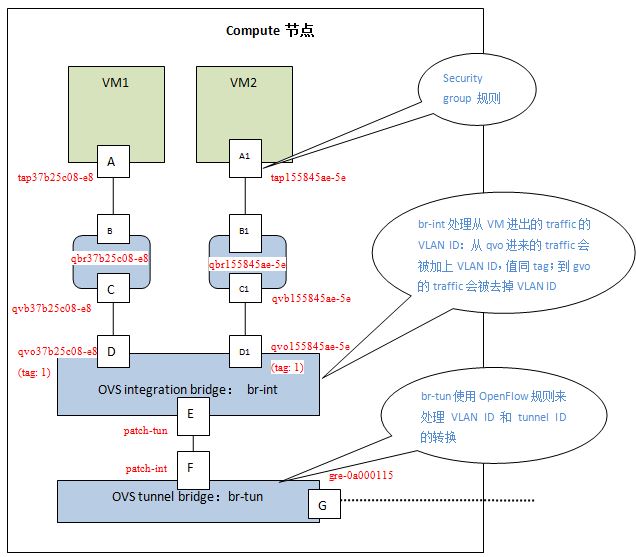
关于接口/port的一些知识点:
1、tap、qbr、qvo、qvb的id是一致的。
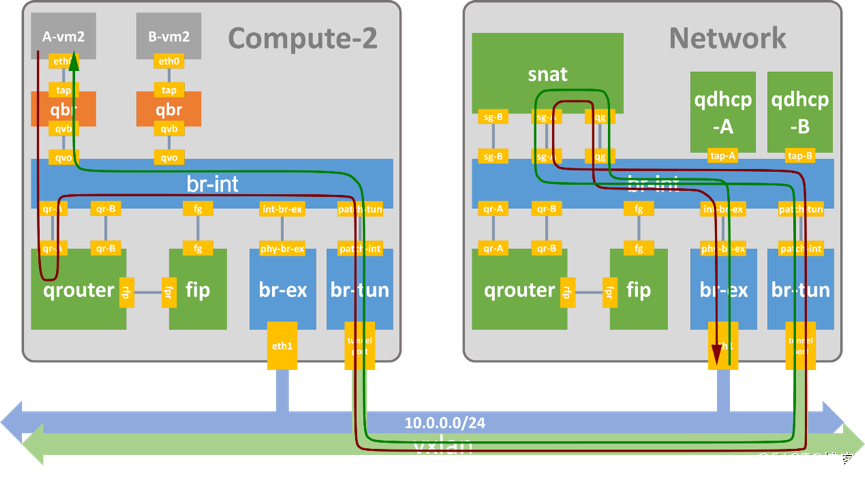
2、每个子网在qrouter上对应1个qr口。qrouter上所有子网共用1个rfp和fpr口。每个子网对应snat-ns上的1个sg口,共用一个qg口。
3、每个router在fip上对应1个fpr口。所有的qrouter共用1个fip-ns。所有router共用1个fg口。
过程简述:
首先要知道:snat发生在snat名称空间下,会将源IP替换为floating网内的某个IP。
访问外网:报文从VM(二层转发)发送到网关qrouter上,qrouter内部通过匹配规则(ip rule)路由发送到snat名称空间的sg口,snat内部先做snat地址转换,然后匹配路由表通过qg口二层转发到floating-gw。
返程:
通过二层转发到snat名称空间下的qg口,snat内部先还原snat转换,然后通过sg口二层转发到VM。
其他:
没有fip的情况,流量必须通过network节点的SNAT转发。network对应的snat名称空间在3个网络节点上的其中一个,随机分配。
流量到达snat名称空间后,会发生SNAT源地址转换。
说明:
新版的安全组采用ovs实现,所以上图中的qbr桥在新版中不存在。eth0对应的tap设备直接插入到br-int桥上。此时,整个系统不再出现linux bridge设备。
介绍:https://www.jianshu.com/p/6fb4072cea5d
ssh -i zdy/id_rsa 100.123.7.189
root@mgt01:~# openstack server list --all --long |grep 100.123.7.189
| cb1ea17d-c142-43ca-a718-705984bc96fa | ies-20210817163009-manager-0                             | ACTIVE  | None       | Running     | Default-vpc-1=172.31.2.130; service_mgt=100.123.7.189                                                                                                                      | N/A (booted from volume)                       | N/A (booted from volume)             | ies_4C8G100G_general              | c184a73d-2578-499e-8007-de70c0f23e1e | az-native-test    | compute01 | this='IES'

#获取到如下信息:
物理机:compute01
ID: cb1ea17d-c142-43ca-a718-705984bc96fa
#经过查询,获取到路由器和snat(都是routerid):
qrouter-351b7ee3-0e4d-47e6-8c3b-44f059e44f12   (位于compute01节点,准确说每个计算节点和network节点都有)
snat-351b7ee3-0e4d-47e6-8c3b-44f059e44f12  (位于network节点)

#因tap设备上的id为port_id的前11位,所以要找到tap设备,必须先找到port ID。
root@mgt01:~# openstack port list --server cb1ea17d-c142-43ca-a718-705984bc96fa |grep 172.31.2.130
| f151b58d-70c5-4796-9782-27fd0e0979c0 |      | fa:16:3e:d9:a1:4f | ip_address='172.31.2.130', subnet_id='9691592e-f795-471d-95a0-9c5e79c3cdaf'  | ACTIVE |

#查看tap设备
root@compute01:~# ip a |grep f151b58d
15837: tapf151b58d-70: <BROADCAST,MULTICAST,UP,LOWER_UP> mtu 1500 qdisc fq_codel master ovs-system state UNKNOWN group default qlen 1000

#该tap设备(tapf151b58d-70)是ovs桥上的一个port(新版的OpenStack使用ovs桥实现安全组,所以就不再出现linux bridge设备)
root@compute01:~# ovs-vsctl list-ports br-int |grep tapf151b58d-70
tapf151b58d-70
172.31.2.130 –> 100.121.0.75
[root@indata-172-31-2-130 ~]# ping 100.121.0.75
PING 100.121.0.75 (100.121.0.75) 56(84) bytes of data.
64 bytes from 100.121.0.75: icmp_seq=1 ttl=62 time=3.14 ms
64 bytes from 100.121.0.75: icmp_seq=2 ttl=62 time=1.88 ms
[root@indata-172-31-2-130 ~]# ip a
1: lo: <LOOPBACK,UP,LOWER_UP> mtu 65536 qdisc noqueue state UNKNOWN group default qlen 1000
    link/loopback 00:00:00:00:00:00 brd 00:00:00:00:00:00
    inet 127.0.0.1/8 scope host lo
       valid_lft forever preferred_lft forever
    inet6 ::1/128 scope host
       valid_lft forever preferred_lft forever
2: eth0: <BROADCAST,MULTICAST,UP,LOWER_UP> mtu 1500 qdisc pfifo_fast state UP group default qlen 1000
    link/ether fa:16:3e:97:63:ec brd ff:ff:ff:ff:ff:ff
    inet 100.123.7.189/16 brd 100.123.255.255 scope global eth0
       valid_lft forever preferred_lft forever
    inet6 fe80::f816:3eff:fe97:63ec/64 scope link
       valid_lft forever preferred_lft forever
3: eth1: <BROADCAST,MULTICAST,UP,LOWER_UP> mtu 1500 qdisc pfifo_fast state UP group default qlen 1000
    link/ether fa:16:3e:d9:a1:4f brd ff:ff:ff:ff:ff:ff
    inet 172.31.2.130/20 brd 172.31.15.255 scope global eth1
       valid_lft forever preferred_lft forever
    inet6 fe80::f816:3eff:fed9:a14f/64 scope link
       valid_lft forever preferred_lft forever

#虚机内部ping 100.121.0.75,根据路由表规则。匹配默认路由
[root@indata-172-31-2-130 ~]# ip r
default via 172.31.0.1 dev eth1  #匹配到默认路由,将数据包通过eth0网卡发往网关172.31.0.1(该网关是qrouter中的qr口)
10.200.8.0/22 via 100.123.255.254 dev eth0 proto static
100.123.0.0/16 dev eth0 proto kernel scope link src 100.123.7.189
169.254.0.0/16 dev eth0 scope link metric 1002
169.254.0.0/16 dev eth1 scope link metric 1003
169.254.169.254 via 172.31.0.1 dev eth1 proto static
172.31.0.0/20 dev eth1 proto kernel scope link src 172.31.2.130

#虚机内部,eth1抓包
[root@indata-172-31-2-130 ~]# tcpdump -nn -v -i eth1 icmp
tcpdump: listening on eth1, link-type EN10MB (Ethernet), capture size 262144 bytes
20:56:12.248828 IP (tos 0x0, ttl 64, id 49830, offset 0, flags [DF], proto ICMP (1), length 84)
    172.31.2.130 > 100.121.0.75: ICMP echo request, id 5184, seq 4662, length 64
20:56:12.252390 IP (tos 0x0, ttl 62, id 33321, offset 0, flags [none], proto ICMP (1), length 84)
    100.121.0.75 > 172.31.2.130: ICMP echo reply, id 5184, seq 4662, length 64
20:56:13.250798 IP (tos 0x0, ttl 64, id 49845, offset 0, flags [DF], proto ICMP (1), length 84)
    172.31.2.130 > 100.121.0.75: ICMP echo request, id 5184, seq 4663, length 64
20:56:13.259195 IP (tos 0x0, ttl 62, id 33552, offset 0, flags [none], proto ICMP (1), length 84)
    100.121.0.75 > 172.31.2.130: ICMP echo reply, id 5184, seq 4663, length 64
经VM网卡eth0发出的包后到达br-int集成网桥的tapf151b58d-70设备上。
root@compute01:~#  tcpdump -env -i tapf151b58d-70 icmp
tcpdump: listening on tapf151b58d-70, link-type EN10MB (Ethernet), capture size 262144 bytes
21:19:11.867524 fa:16:3e:d9:a1:4f > fa:16:3e:85:52:62, ethertype IPv4 (0x0800), length 98: (tos 0x0, ttl 64, id 11408, offset 0, flags [DF], proto ICMP (1), length 84)
    172.31.2.130 > 100.121.0.75: ICMP echo request, id 5184, seq 6038, length 64
21:19:11.868478 fa:16:3e:e1:0a:d9 > fa:16:3e:d9:a1:4f, ethertype IPv4 (0x0800), length 98: (tos 0x0, ttl 62, id 10310, offset 0, flags [none], proto ICMP (1), length 84)
    100.121.0.75 > 172.31.2.130: ICMP echo reply, id 5184, seq 6038, length 64
21:19:12.868867 fa:16:3e:d9:a1:4f > fa:16:3e:85:52:62, ethertype IPv4 (0x0800), length 98: (tos 0x0, ttl 64, id 12190, offset 0, flags [DF], proto ICMP (1), length 84)
    172.31.2.130 > 100.121.0.75: ICMP echo request, id 5184, seq 6039, length 64
21:19:12.870198 fa:16:3e:e1:0a:d9 > fa:16:3e:d9:a1:4f, ethertype IPv4 (0x0800), length 98: (tos 0x0, ttl 62, id 10551, offset 0, flags [none], proto ICMP (1), length 84)
    100.121.0.75 > 172.31.2.130: ICMP echo reply, id 5184, seq 6039, length 64
报文到达tapf151b58d-70设备后,此时会经过流表规则定义的安全组规则检查、正常二层转发等,到达br-int桥的qr-9a2c0e41-0c这个port上。
root@compute01:~# ovs-vsctl list-ports br-int |grep qr-9a2c0e41-0c
qr-9a2c0e41-0c
而br-int桥上的qr-9a2c0e41-0c这个port是qrouter名称空间中的设备(该设备作为port加入到的br-int桥上),即此时报文最终进入qrouter上。
#compute01上的qrouter上
root@compute01:~# ip net exec qrouter-351b7ee3-0e4d-47e6-8c3b-44f059e44f12 bash

root@compute01:~# tcpdump -nn -v -i qr-9a2c0e41-0c icmp   #只有出去的报文没有返程报文;ttl为64和63,说明在这个网卡上经过2次。ttl=64是进入qrouter的报文,ttl=63是从qrouter出去的报文
tcpdump: listening on qr-9a2c0e41-0c, link-type EN10MB (Ethernet), capture size 262144 bytes
^C19:42:15.285697 IP (tos 0x0, ttl 64, id 63285, offset 0, flags [DF], proto ICMP (1), length 84)  	#in
    172.31.2.130 > 100.121.0.75: ICMP echo request, id 5184, seq 231, length 64
19:42:15.285788 IP (tos 0x0, ttl 63, id 63285, offset 0, flags [DF], proto ICMP (1), length 84)			#out
    172.31.2.130 > 100.121.0.75: ICMP echo request, id 5184, seq 231, length 64
19:42:16.286658 IP (tos 0x0, ttl 64, id 63582, offset 0, flags [DF], proto ICMP (1), length 84)			#in
    172.31.2.130 > 100.121.0.75: ICMP echo request, id 5184, seq 232, length 64
19:42:16.286740 IP (tos 0x0, ttl 63, id 63582, offset 0, flags [DF], proto ICMP (1), length 84)			#out
    172.31.2.130 > 100.121.0.75: ICMP echo request, id 5184, seq 232, length 64

#为什么会有进入和出去的报文呢?我们可以通过路由条目分析:
root@compute01:~# ip r
169.254.68.106/31 dev rfp-351b7ee3-0 proto kernel scope link src 169.254.68.106
169.254.74.216/31 dev rfp-351b7ee3-0 proto kernel scope link src 169.254.74.216
169.254.83.154/31 dev rfp-351b7ee3-0 proto kernel scope link src 169.254.83.154
169.254.86.184/31 dev rfp-351b7ee3-0 proto kernel scope link src 169.254.86.184
169.254.88.134/31 dev rfp-351b7ee3-0 proto kernel scope link src 169.254.88.134
169.254.99.230/31 dev rfp-351b7ee3-0 proto kernel scope link src 169.254.99.230
169.254.103.4/31 dev rfp-351b7ee3-0 proto kernel scope link src 169.254.103.4
169.254.115.22/31 dev rfp-351b7ee3-0 proto kernel scope link src 169.254.115.22
169.254.121.214/31 dev rfp-351b7ee3-0 proto kernel scope link src 169.254.121.214
172.31.0.0/20 dev qr-9a2c0e41-0c proto kernel scope link src 172.31.0.1
#以上规则,都没有匹配到,去看规则路由(ip rule)

#流量进去qrouter中,匹配到策略路由查询2887712769号表,2887712769号表中有条默认路由
root@compute01:~# ip rule
0:	from all lookup local
32766:	from all lookup main
32767:	from all lookup default
34386:	from 172.31.1.192 lookup 16
34426:	from 172.31.1.152 lookup 16
......
71718:	from 172.31.1.192 lookup 16
71778:	from 172.31.1.28 lookup 16
71862:	from 172.31.1.152 lookup 16
2887712769:	from 172.31.0.1/20 lookup 2887712769   #匹配到该条目(匹配整个子网。有fip的情况是匹配具体的IP)

root@compute01:~# ip route show table 2887712769
default via 172.31.3.69 dev qr-9a2c0e41-0c proto static   #qr网关收到报文后,通过路由表得知下一跳通过qr口发往172.31.3.69,172.31.3.69这个地址是在网络节点snat名字空间中sg口上的ip.(收到报文和发出报文都是从qr口)

root@compute01:~# tcpdump -nn -v -i qr-9a2c0e41-0c icmp   #报文只有单向报文,ttl为64和63,说明在这个网卡上经过2次。
tcpdump: listening on qr-9a2c0e41-0c, link-type EN10MB (Ethernet), capture size 262144 bytes
tcpdump: listening on qr-9a2c0e41-0c, link-type EN10MB (Ethernet), capture size 262144 bytes
^C19:42:15.285697 IP (tos 0x0, ttl 64, id 63285, offset 0, flags [DF], proto ICMP (1), length 84)  	#in
    172.31.2.130 > 100.121.0.75: ICMP echo request, id 5184, seq 231, length 64
19:42:15.285788 IP (tos 0x0, ttl 63, id 63285, offset 0, flags [DF], proto ICMP (1), length 84)			#out
    172.31.2.130 > 100.121.0.75: ICMP echo request, id 5184, seq 231, length 64
19:42:16.286658 IP (tos 0x0, ttl 64, id 63582, offset 0, flags [DF], proto ICMP (1), length 84)			#in
    172.31.2.130 > 100.121.0.75: ICMP echo request, id 5184, seq 232, length 64
19:42:16.286740 IP (tos 0x0, ttl 63, id 63582, offset 0, flags [DF], proto ICMP (1), length 84)			#out
    172.31.2.130 > 100.121.0.75: ICMP echo request, id 5184, seq 232, length 64
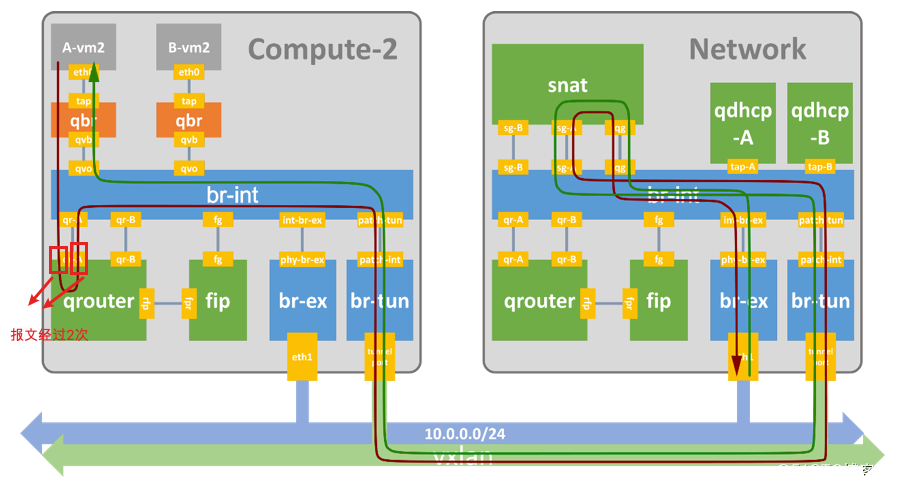
从qr口发出去的报文,进入到br-int桥。通过正常的二层转发,进入到patch-tun设备。
说明:
patch-tun、patch-int、tunnel-port口不存在与操作系统或netns上(操作系统上无法查询到该设备),只存在于ovs桥上,不在linux系统或名称空间上,对于这种设备,还没找到抓包的方法。
进入patch-tun设备的报文同事会到达patch-int设备,然后根据br-tun的流表规则,依次经过compute节点br-tun桥 –> 隧道(隧道网卡) –> network节点br-tun桥 –> patch-int设备
vxlan封包操作发生在vxlan口上。
进入patch-int设备的报文同事会到达patch-tun设备,通过正常的二层转发,进入到sg口设备。
经过br-int的流表二层转发,直接到snat名称空间的sg口。
snat位于network节点。
root@mgt06:~# ip net exec snat-351b7ee3-0e4d-47e6-8c3b-44f059e44f12 bash

root@mgt06:~# tcpdump -env -i sg-8992ccf7-73 icmp
tcpdump: listening on sg-8992ccf7-73, link-type EN10MB (Ethernet), capture size 262144 bytes
^C20:48:28.846571 fa:16:3e:85:52:62 > fa:16:3e:e1:0a:d9, ethertype IPv4 (0x0800), length 98: (tos 0x0, ttl 63, id 1966, offset 0, flags [DF], proto ICMP (1), length 84)
    172.31.2.130 > 100.121.0.75: ICMP echo request, id 5184, seq 4198, length 64
20:48:28.848753 fa:16:3e:e1:0a:d9 > fa:16:3e:d9:a1:4f, ethertype IPv4 (0x0800), length 98: (tos 0x0, ttl 62, id 41405, offset 0, flags [none], proto ICMP (1), length 84)
    100.121.0.75 > 172.31.2.130: ICMP echo reply, id 5184, seq 4198, length 64
20:48:29.848542 fa:16:3e:85:52:62 > fa:16:3e:e1:0a:d9, ethertype IPv4 (0x0800), length 98: (tos 0x0, ttl 63, id 2370, offset 0, flags [DF], proto ICMP (1), length 84)
    172.31.2.130 > 100.121.0.75: ICMP echo request, id 5184, seq 4199, length 64
20:48:29.849192 fa:16:3e:e1:0a:d9 > fa:16:3e:d9:a1:4f, ethertype IPv4 (0x0800), length 98: (tos 0x0, ttl 62, id 41420, offset 0, flags [none], proto ICMP (1), length 84)
    100.121.0.75 > 172.31.2.130: ICMP echo reply, id 5184, seq 4199, length 64
20:48:30.849935 fa:16:3e:85:52:62 > fa:16:3e:e1:0a:d9, ethertype IPv4 (0x0800), length 98: (tos 0x0, ttl 63, id 3252, offset 0, flags [DF], proto ICMP (1), length 84)
    172.31.2.130 > 100.121.0.75: ICMP echo request, id 5184, seq 4200, length 64
20:48:30.855832 fa:16:3e:e1:0a:d9 > fa:16:3e:d9:a1:4f, ethertype IPv4 (0x0800), length 98: (tos 0x0, ttl 62, id 41458, offset 0, flags [none], proto ICMP (1), length 84)
    100.121.0.75 > 172.31.2.130: ICMP echo reply, id 5184, seq 4200, length 64

root@mgt06:~# ip a
1: lo: <LOOPBACK,UP,LOWER_UP> mtu 65536 qdisc noqueue state UNKNOWN group default qlen 1000
    link/loopback 00:00:00:00:00:00 brd 00:00:00:00:00:00
    inet 127.0.0.1/8 scope host lo
       valid_lft forever preferred_lft forever
    inet6 ::1/128 scope host
       valid_lft forever preferred_lft forever
2: tunl0@NONE: <NOARP> mtu 1480 qdisc noop state DOWN group default qlen 1000
    link/ipip 0.0.0.0 brd 0.0.0.0
290: sg-8992ccf7-73: <BROADCAST,MULTICAST,UP,LOWER_UP> mtu 1500 qdisc noqueue state UNKNOWN group default qlen 1000
    link/ether fa:16:3e:e1:0a:d9 brd ff:ff:ff:ff:ff:ff
    inet 172.31.3.69/20 brd 172.31.15.255 scope global sg-8992ccf7-73   #qrouter上的下一跳IP
       valid_lft forever preferred_lft forever
    inet6 fe80::f816:3eff:fee1:ad9/64 scope link
       valid_lft forever preferred_lft forever
296: qg-77a4a3f7-9a: <BROADCAST,MULTICAST,UP,LOWER_UP> mtu 1500 qdisc noqueue state UNKNOWN group default qlen 1000
    link/ether fa:16:3e:b3:0e:c6 brd ff:ff:ff:ff:ff:ff
    inet 100.122.2.130/16 brd 100.122.255.255 scope global qg-77a4a3f7-9a  #snat后的源地址,表示snat的默认IP
       valid_lft forever preferred_lft forever
    inet 100.122.3.93/32 brd 100.122.3.93 scope global qg-77a4a3f7-9a
       valid_lft forever preferred_lft forever
    inet 100.122.2.227/32 brd 100.122.2.227 scope global qg-77a4a3f7-9a
       valid_lft forever preferred_lft forever
    inet 100.122.2.110/32 brd 100.122.2.110 scope global qg-77a4a3f7-9a
       valid_lft forever preferred_lft forever
    inet 100.122.1.28/32 brd 100.122.1.28 scope global qg-77a4a3f7-9a
       valid_lft forever preferred_lft forever
    inet 100.122.0.52/32 brd 100.122.0.52 scope global qg-77a4a3f7-9a
       valid_lft forever preferred_lft forever
    inet 100.122.1.9/32 brd 100.122.1.9 scope global qg-77a4a3f7-9a
       valid_lft forever preferred_lft forever
    inet 100.122.0.163/32 brd 100.122.0.163 scope global qg-77a4a3f7-9a
       valid_lft forever preferred_lft forever
    inet6 fe80::f816:3eff:feb3:ec6/64 scope link
       valid_lft forever preferred_lft forever

root@mgt06:~# ip r
default via 100.122.255.254 dev qg-77a4a3f7-9a proto static #流量到达sg口后,通过路由表得知下一跳通过qg口送往floating网网关(100.122.255.254)
100.122.0.0/16 dev qg-77a4a3f7-9a proto kernel scope link src 100.122.2.130
172.31.0.0/20 dev sg-8992ccf7-73 proto kernel scope link src 172.31.3.69

#在经过路由后从qg口发出前,会先通过POSTROUTING链上的snat规则将源地址换成sg口的地址。然后从qg口发出,发送至floating网的网关(100.122.255.254)
root@mgt06:~# iptables -S -tnat
-P PREROUTING ACCEPT
-P INPUT ACCEPT
-P OUTPUT ACCEPT
-P POSTROUTING ACCEPT
-N neutron-l3-agent-OUTPUT
-N neutron-l3-agent-POSTROUTING
-N neutron-l3-agent-PREROUTING
-N neutron-l3-agent-float-snat
-N neutron-l3-agent-snat
-N neutron-postrouting-bottom
-A PREROUTING -j neutron-l3-agent-PREROUTING
-A OUTPUT -j neutron-l3-agent-OUTPUT
-A POSTROUTING -j neutron-l3-agent-POSTROUTING
-A POSTROUTING -j neutron-l3-agent-POSTROUTING
-A POSTROUTING -j neutron-postrouting-bottom
-A neutron-l3-agent-OUTPUT -d 100.122.3.93/32 -j DNAT [unsupported revision]
-A neutron-l3-agent-OUTPUT -d 100.122.2.227/32 -j DNAT [unsupported revision]
-A neutron-l3-agent-OUTPUT -d 100.122.0.163/32 -j DNAT [unsupported revision]
-A neutron-l3-agent-OUTPUT -d 100.122.2.110/32 -j DNAT [unsupported revision]
-A neutron-l3-agent-OUTPUT -d 100.122.1.28/32 -j DNAT [unsupported revision]
-A neutron-l3-agent-OUTPUT -d 100.122.0.52/32 -j DNAT [unsupported revision]
-A neutron-l3-agent-OUTPUT -d 100.122.1.9/32 -j DNAT [unsupported revision]
-A neutron-l3-agent-POSTROUTING ! -o qg-77a4a3f7-9a -m conntrack ! --ctstate DNAT -j ACCEPT
-A neutron-l3-agent-PREROUTING -d 100.122.3.93/32 -j DNAT [unsupported revision]
-A neutron-l3-agent-PREROUTING -d 100.122.2.227/32 -j DNAT [unsupported revision]
-A neutron-l3-agent-PREROUTING -d 100.122.0.163/32 -j DNAT [unsupported revision]
-A neutron-l3-agent-PREROUTING -d 100.122.2.110/32 -j DNAT [unsupported revision]
-A neutron-l3-agent-PREROUTING -d 100.122.1.28/32 -j DNAT [unsupported revision]
-A neutron-l3-agent-PREROUTING -d 100.122.0.52/32 -j DNAT [unsupported revision]
-A neutron-l3-agent-PREROUTING -d 100.122.1.9/32 -j DNAT [unsupported revision]
-A neutron-l3-agent-float-snat -s 172.31.4.189/32 -j SNAT --to-source 100.122.3.93 --random-fully
-A neutron-l3-agent-float-snat -s 172.31.0.234/32 -j SNAT --to-source 100.122.2.227 --random-fully
-A neutron-l3-agent-float-snat -s 172.31.3.79/32 -j SNAT --to-source 100.122.0.163 --random-fully
-A neutron-l3-agent-float-snat -s 172.31.3.235/32 -j SNAT --to-source 100.122.2.110 --random-fully
-A neutron-l3-agent-float-snat -s 172.31.1.184/32 -j SNAT --to-source 100.122.1.28 --random-fully
-A neutron-l3-agent-float-snat -s 172.31.1.132/32 -j SNAT --to-source 100.122.0.52 --random-fully
-A neutron-l3-agent-float-snat -s 172.31.4.160/32 -j SNAT --to-source 100.122.1.9 --random-fully
-A neutron-l3-agent-snat -j neutron-l3-agent-float-snat
-A neutron-l3-agent-snat -o qg-77a4a3f7-9a -j SNAT --to-source 100.122.2.130 --random-fully  #snat:从qg口出去的包,源ip由172.31.2.130修改为100.122.2.130
-A neutron-l3-agent-snat -m mark ! --mark 0x2/0xffff -m conntrack --ctstate DNAT -j SNAT --to-source 100.122.2.130 --random-fully
-A neutron-postrouting-bottom -m comment --comment "Perform source NAT on outgoing traffic." -j neutron-l3-agent-snat

# 经过SNAT后的报文,从qg-77a4a3f7-9a发出,发往100.122.255.254
root@mgt06:~# tcpdump -env -i qg-77a4a3f7-9a icmp
tcpdump: listening on qg-77a4a3f7-9a, link-type EN10MB (Ethernet), capture size 262144 bytes
^C20:58:54.856456 fa:16:3e:b3:0e:c6 > 00:1e:08:0e:bc:45, ethertype IPv4 (0x0800), length 98: (tos 0x0, ttl 62, id 1576, offset 0, flags [DF], proto ICMP (1), length 84)
    100.122.2.130 > 100.121.0.75: ICMP echo request, id 56639, seq 4823, length 64
20:58:54.856839 00:1e:08:0e:bc:45 > fa:16:3e:b3:0e:c6, ethertype IPv4 (0x0800), length 98: (tos 0x0, ttl 63, id 54575, offset 0, flags [none], proto ICMP (1), length 84)
    100.121.0.75 > 100.122.2.130: ICMP echo reply, id 56639, seq 4823, length 64
20:58:55.857709 fa:16:3e:b3:0e:c6 > 00:1e:08:0e:bc:45, ethertype IPv4 (0x0800), length 98: (tos 0x0, ttl 62, id 2195, offset 0, flags [DF], proto ICMP (1), length 84)
    100.122.2.130 > 100.121.0.75: ICMP echo request, id 56639, seq 4824, length 64
20:58:55.857998 00:1e:08:0e:bc:45 > fa:16:3e:b3:0e:c6, ethertype IPv4 (0x0800), length 98: (tos 0x0, ttl 63, id 54733, offset 0, flags [none], proto ICMP (1), length 84)
    100.121.0.75 > 100.122.2.130: ICMP echo reply, id 56639, seq 4824, length 64
进入的br-int的qg-77a4a3f7-9a的包,经过br-int桥的正常的二层转发,进入到int-br-ex口。
报文进入到int-br-ex口的对端phy-br-ex口,经过br-ex桥的正常的二层转发,进入到物理网卡enp4s0这个port上。
root@mgt06:~# tcpdump -env -i enp4s0 icmp
tcpdump: listening on enp4s0, link-type EN10MB (Ethernet), capture size 262144 bytes
21:52:59.187536 00:1e:08:0e:bc:45 > fa:16:3e:b3:0e:c6, ethertype 802.1Q (0x8100), length 102: vlan 20, p 0, ethertype IPv4, (tos 0x0, ttl 63, id 6840, offset 0, flags [none], proto ICMP (1), length 84)
    100.121.0.75 > 100.122.2.130: ICMP echo reply, id 56639, seq 8062, length 64
21:53:00.188660 00:1e:08:0e:bc:45 > fa:16:3e:b3:0e:c6, ethertype 802.1Q (0x8100), length 102: vlan 20, p 0, ethertype IPv4, (tos 0x0, ttl 63, id 7042, offset 0, flags [none], proto ICMP (1), length 84)
    100.121.0.75 > 100.122.2.130: ICMP echo reply, id 56639, seq 8063, length 64
21:53:01.190291 00:1e:08:0e:bc:45 > fa:16:3e:b3:0e:c6, ethertype 802.1Q (0x8100), length 102: vlan 20, p 0, ethertype IPv4, (tos 0x0, ttl 63, id 7252, offset 0, flags [none], proto ICMP (1), length 84)
    100.121.0.75 > 100.122.2.130: ICMP echo reply, id 56639, seq 8064, length 64
只有返程的报文??
此后,从物理口送往交换机的floating网网关(100.122.255.254),根据在物理交换机上配置路由条目,依次进行转发100.121.255.254(service_data的网关)–> 100.121.0.75。
返程包从qg口回来,匹配路由后从sg口送出,送往虚机。
分析过程大同小异,此处忽略ovs桥的分析(因为可以认为ovs桥起到了正常的二层转发),只做简要分析。
进入到物理网卡的报文,通过arp,找到100.122.2.130对应的设备qg-77a4a3f7-9a,此时报文发送至qg-77a4a3f7-9a口。
root@mgt06:~# tcpdump -env -i enp4s0 icmp
tcpdump: listening on enp4s0, link-type EN10MB (Ethernet), capture size 262144 bytes
21:52:59.187536 00:1e:08:0e:bc:45 > fa:16:3e:b3:0e:c6, ethertype 802.1Q (0x8100), length 102: vlan 20, p 0, ethertype IPv4, (tos 0x0, ttl 63, id 6840, offset 0, flags [none], proto ICMP (1), length 84)
    100.121.0.75 > 100.122.2.130: ICMP echo reply, id 56639, seq 8062, length 64
21:53:00.188660 00:1e:08:0e:bc:45 > fa:16:3e:b3:0e:c6, ethertype 802.1Q (0x8100), length 102: vlan 20, p 0, ethertype IPv4, (tos 0x0, ttl 63, id 7042, offset 0, flags [none], proto ICMP (1), length 84)
    100.121.0.75 > 100.122.2.130: ICMP echo reply, id 56639, seq 8063, length 64
21:53:01.190291 00:1e:08:0e:bc:45 > fa:16:3e:b3:0e:c6, ethertype 802.1Q (0x8100), length 102: vlan 20, p 0, ethertype IPv4, (tos 0x0, ttl 63, id 7252, offset 0, flags [none], proto ICMP (1), length 84)
    100.121.0.75 > 100.122.2.130: ICMP echo reply, id 56639, seq 8064, length 64
依次经过br-ex、br-int的流表二层转发,直接到snat名称空间的qg口。
root@mgt06:~# tcpdump -env -i qg-77a4a3f7-9a icmp
tcpdump: listening on qg-77a4a3f7-9a, link-type EN10MB (Ethernet), capture size 262144 bytes
^C20:58:54.856456 fa:16:3e:b3:0e:c6 > 00:1e:08:0e:bc:45, ethertype IPv4 (0x0800), length 98: (tos 0x0, ttl 62, id 1576, offset 0, flags [DF], proto ICMP (1), length 84)
    100.122.2.130 > 100.121.0.75: ICMP echo request, id 56639, seq 4823, length 64
20:58:54.856839 00:1e:08:0e:bc:45 > fa:16:3e:b3:0e:c6, ethertype IPv4 (0x0800), length 98: (tos 0x0, ttl 63, id 54575, offset 0, flags [none], proto ICMP (1), length 84)
    100.121.0.75 > 100.122.2.130: ICMP echo reply, id 56639, seq 4823, length 64

#返程包在PREROUTING链处,还原之前的SNAT操作。目标地址转换:100.122.2.130 --> 172.31.2.130

root@mgt06:~# ip r
default via 100.122.255.254 dev qg-77a4a3f7-9a proto static
100.122.0.0/16 dev qg-77a4a3f7-9a proto kernel scope link src 100.122.2.130
172.31.0.0/20 dev sg-8992ccf7-73 proto kernel scope link src 172.31.3.69    #流量从sg口发出,发往172.31.2.130(VM的虚拟网卡)
此后,报文经过大二层转发,依次通过:br-int(network节点) –> br-tun(network节点) –> vxlan隧道 –> br-tun(compute节点) –> br-int(compute节点) ,最终达到虚拟机。
#虚机内部,eth1抓包
[root@indata-172-31-2-130 ~]# tcpdump -nn -v -i eth1 icmp
tcpdump: listening on eth1, link-type EN10MB (Ethernet), capture size 262144 bytes
20:56:12.248828 IP (tos 0x0, ttl 64, id 49830, offset 0, flags [DF], proto ICMP (1), length 84)
    172.31.2.130 > 100.121.0.75: ICMP echo request, id 5184, seq 4662, length 64
20:56:12.252390 IP (tos 0x0, ttl 62, id 33321, offset 0, flags [none], proto ICMP (1), length 84)
    100.121.0.75 > 172.31.2.130: ICMP echo reply, id 5184, seq 4662, length 64
20:56:13.250798 IP (tos 0x0, ttl 64, id 49845, offset 0, flags [DF], proto ICMP (1), length 84)
    172.31.2.130 > 100.121.0.75: ICMP echo request, id 5184, seq 4663, length 64
20:56:13.259195 IP (tos 0x0, ttl 62, id 33552, offset 0, flags [none], proto ICMP (1), length 84)
    100.121.0.75 > 172.31.2.130: ICMP echo reply, id 5184, seq 4663, length 64
该过程中并未详细分析ovs桥,此处对这些桥的功能做简要说明。
br-int桥主要起到2个作用:
作为一个正常的二层交换机使用,即实现VLAN标签的增删和正常的二层自学习与转发。
- 实现安全组:每个虚机有个虚机网卡 eth0,eth0和host上的一个TAP设备连接,该TAP设备直接挂载在一个Linux Bridge上,该Linux Bridge和OVS br-int相连。其实理想情况下,TAP设备能和OVS br-int直接相连就好了,但是,因为OpenStack实现Security Group的需要,这里要多加一层Linux bridge。OpenStack使用Linux TAP设备上的iptables来实现Security Group规则,而OVS不支持直接和br-int桥相连的TAP设备上的iptables。(新版的openstack支持使用ovs实现安全组)
- 作为一个 NORMAL 二层交换机使用,根据 vlan 和 mac 进行转发(增删内部VLAN tag(租户网络的tag)、二层转发)
br-tun桥的作用:
采用多级流表实现节点间转发,并负责隧道的封装/解封装。
- 删除内部VLAN tag,并添加vxlan id(返程包相反)。详细地说:要将内部过来的网包进行合理甄别,带着正确 内部vlan tag 过来的,去掉vlan头,然后添加vxlan头从正确的 tunnel 扔出去;外面带着正确 tunnel 号过来的,要改到对应的内部 vlan tag 扔到里面。
br-ex桥的作用:
- 作为一个 NORMAL 二层交换机使用(正常的二层转发设备),