
Ubuntu内核升级与grub2
参考链接:https://www.jianshu.com/p/0c2e7a530cfe
我们需要的软件包共有四个,即两个header头文件,一个image镜像,一个modules模块。Ubuntu内核下载地址
注意:在内核版本4.17之前(不含4.17)中是无modules文件的,所以你只需要3个软件包即两个header,一个image即可完成更新。且网上目前搜索到的内核更新教程通常都是适合4.17内核之前的,而我们更新到4.17之后版本,例如我们更新到5.4.187,在dkpg步骤时候会提示缺少依赖项,没有modules文件!
# 1、先下载对应的.deb文件,然后执行:
apt -y update  # 可选
apt -y upgrade # 可选

wget https://kernel.ubuntu.com/~kernel-ppa/mainline/v5.4.187/amd64/linux-headers-5.4.187-0504187-generic_5.4.187-0504187.202203230944_amd64.deb
wget https://kernel.ubuntu.com/~kernel-ppa/mainline/v5.4.187/amd64/linux-headers-5.4.187-0504187_5.4.187-0504187.202203230944_all.deb
wget https://kernel.ubuntu.com/~kernel-ppa/mainline/v5.4.187/amd64/linux-image-unsigned-5.4.187-0504187-generic_5.4.187-0504187.202203230944_amd64.deb
wget https://kernel.ubuntu.com/~kernel-ppa/mainline/v5.4.187/amd64/linux-modules-5.4.187-0504187-generic_5.4.187-0504187.202203230944_amd64.deb
sudo dpkg -i *.deb

# 2、当提示成功安装后,进行重启:
update-initramfs -u # 可选,但建议(shell脚本)
reboot
grub的真正读取的配置文件为:/boot/grub/grub.cfg
grub的用户自定义默认配置在:/etc/default/grub,
root@mgt01:~# cat /etc/default/grub
# If you change this file, run 'update-grub' afterwards to update
# /boot/grub/grub.cfg.
# For full documentation of the options in this file, see:
#   info -f grub -n 'Simple configuration'

GRUB_DEFAULT=0
GRUB_TIMEOUT_STYLE=hidden
GRUB_TIMEOUT=0
GRUB_DISTRIBUTOR=`lsb_release -i -s 2> /dev/null || echo Debian`
GRUB_CMDLINE_LINUX_DEFAULT="quiet splash"
GRUB_CMDLINE_LINUX=""

# Uncomment to enable BadRAM filtering, modify to suit your needs
# This works with Linux (no patch required) and with any kernel that obtains
# the memory map information from GRUB (GNU Mach, kernel of FreeBSD ...)
#GRUB_BADRAM="0x01234567,0xfefefefe,0x89abcdef,0xefefefef"

# Uncomment to disable graphical terminal (grub-pc only)
#GRUB_TERMINAL=console

# The resolution used on graphical terminal
# note that you can use only modes which your graphic card supports via VBE
# you can see them in real GRUB with the command `vbeinfo'
#GRUB_GFXMODE=640x480

# Uncomment if you don't want GRUB to pass "root=UUID=xxx" parameter to Linux
#GRUB_DISABLE_LINUX_UUID=true

# Uncomment to disable generation of recovery mode menu entries
#GRUB_DISABLE_RECOVERY="true"

# Uncomment to get a beep at grub start
#GRUB_INIT_TUNE="480 440 1"
如果修改这个文件,需要把相关的配置同步到/boot/grub/grub.cfg中。
同步命令:
- 在ubuntu中,可以使用
update-grub命令,该命令是对grub-mkconfig命令的封装。update-grub2是update-grub是同一个文件的软连接。
root@mgt01:~# which update-grub
/usr/sbin/update-grub
root@mgt01:~# ll /usr/sbin/update-grub2
lrwxrwxrwx 1 root root 11 Feb 25 03:47 /usr/sbin/update-grub2 -> update-grub*
root@mgt01:~# cat /usr/sbin/update-grub
#!/bin/sh
set -e
exec grub-mkconfig -o /boot/grub/grub.cfg "$@"
- 其他发行版,可以直接使用grub-mkconfig命令来生成grub的配置文件(centos 可以使用
grub2-set-default 0设置默认的启动项)
grub-mkconfig -o /boot/grub/grub.cfg
上面已经说了,grub的真正读取的配置文件为:/boot/grub/grub.cfg
root@mgt01:~# cat /boot/grub/grub.cfg
#
# DO NOT EDIT THIS FILE
#
# It is automatically generated by grub-mkconfig using templates
# from /etc/grub.d and settings from /etc/default/grub
#

### BEGIN /etc/grub.d/00_header ###
if [ -s $prefix/grubenv ]; then
  set have_grubenv=true
  load_env
fi
if [ "${next_entry}" ] ; then
   set default="${next_entry}"
   set next_entry=
   save_env next_entry
   set boot_once=true
else
   set default="0"
fi

if [ x"${feature_menuentry_id}" = xy ]; then
  menuentry_id_option="--id"
else
  menuentry_id_option=""
fi

export menuentry_id_option

if [ "${prev_saved_entry}" ]; then
  set saved_entry="${prev_saved_entry}"
  save_env saved_entry
  set prev_saved_entry=
  save_env prev_saved_entry
  set boot_once=true
fi

function savedefault {
  if [ -z "${boot_once}" ]; then
    saved_entry="${chosen}"
    save_env saved_entry
  fi
}
function recordfail {
  set recordfail=1
  if [ -n "${have_grubenv}" ]; then if [ -z "${boot_once}" ]; then save_env recordfail; fi; fi
}
function load_video {
  if [ x$feature_all_video_module = xy ]; then
    insmod all_video
  else
    insmod efi_gop
    insmod efi_uga
    insmod ieee1275_fb
    insmod vbe
    insmod vga
    insmod video_bochs
    insmod video_cirrus
  fi
}

if [ x$feature_default_font_path = xy ] ; then
   font=unicode
else
insmod part_gpt
insmod ext2
set root='hd0,gpt2'
if [ x$feature_platform_search_hint = xy ]; then
  search --no-floppy --fs-uuid --set=root --hint-bios=hd0,gpt2 --hint-efi=hd0,gpt2 --hint-baremetal=ahci0,gpt2  2a998634-b58a-47b7-b333-a0ae6305a1e3
else
  search --no-floppy --fs-uuid --set=root 2a998634-b58a-47b7-b333-a0ae6305a1e3
fi
    font="/usr/share/grub/unicode.pf2"
fi

if loadfont $font ; then
  set gfxmode=auto
  load_video
  insmod gfxterm
  set locale_dir=$prefix/locale
  set lang=en_US
  insmod gettext
fi
terminal_output gfxterm
if [ "${recordfail}" = 1 ] ; then
  set timeout=30
else
  if [ x$feature_timeout_style = xy ] ; then
    set timeout_style=hidden
    set timeout=0
  # Fallback hidden-timeout code in case the timeout_style feature is
  # unavailable.
  elif sleep --interruptible 0 ; then
    set timeout=0
  fi
fi
### END /etc/grub.d/00_header ###

### BEGIN /etc/grub.d/05_debian_theme ###
set menu_color_normal=white/black
set menu_color_highlight=black/light-gray
### END /etc/grub.d/05_debian_theme ###

### BEGIN /etc/grub.d/10_linux ###
function gfxmode {
	set gfxpayload="${1}"
	if [ "${1}" = "keep" ]; then
		set vt_handoff=vt.handoff=1
	else
		set vt_handoff=
	fi
}
if [ "${recordfail}" != 1 ]; then
  if [ -e ${prefix}/gfxblacklist.txt ]; then
    if hwmatch ${prefix}/gfxblacklist.txt 3; then
      if [ ${match} = 0 ]; then
        set linux_gfx_mode=keep
      else
        set linux_gfx_mode=text
      fi
    else
      set linux_gfx_mode=text
    fi
  else
    set linux_gfx_mode=keep
  fi
else
  set linux_gfx_mode=text
fi
export linux_gfx_mode
menuentry 'Ubuntu' --class ubuntu --class gnu-linux --class gnu --class os $menuentry_id_option 'gnulinux-simple-2a998634-b58a-47b7-b333-a0ae6305a1e3' {
	recordfail
	load_video
	gfxmode $linux_gfx_mode
	insmod gzio
	if [ x$grub_platform = xxen ]; then insmod xzio; insmod lzopio; fi
	insmod part_gpt
	insmod ext2
	set root='hd0,gpt2'
	if [ x$feature_platform_search_hint = xy ]; then
	  search --no-floppy --fs-uuid --set=root --hint-bios=hd0,gpt2 --hint-efi=hd0,gpt2 --hint-baremetal=ahci0,gpt2  2a998634-b58a-47b7-b333-a0ae6305a1e3
	else
	  search --no-floppy --fs-uuid --set=root 2a998634-b58a-47b7-b333-a0ae6305a1e3
	fi
        linux	/boot/vmlinuz-5.4.61-050461-generic root=UUID=2a998634-b58a-47b7-b333-a0ae6305a1e3 ro  quiet splash $vt_handoff
	initrd	/boot/initrd.img-5.4.61-050461-generic
}
submenu 'Advanced options for Ubuntu' $menuentry_id_option 'gnulinux-advanced-2a998634-b58a-47b7-b333-a0ae6305a1e3' {
	menuentry 'Ubuntu, with Linux 5.4.61-050461-generic' --class ubuntu --class gnu-linux --class gnu --class os $menuentry_id_option 'gnulinux-5.4.61-050461-generic-advanced-2a998634-b58a-47b7-b333-a0ae6305a1e3' {
		recordfail
		load_video
		gfxmode $linux_gfx_mode
		insmod gzio
		if [ x$grub_platform = xxen ]; then insmod xzio; insmod lzopio; fi
		insmod part_gpt
		insmod ext2
		set root='hd0,gpt2'
		if [ x$feature_platform_search_hint = xy ]; then
		  search --no-floppy --fs-uuid --set=root --hint-bios=hd0,gpt2 --hint-efi=hd0,gpt2 --hint-baremetal=ahci0,gpt2  2a998634-b58a-47b7-b333-a0ae6305a1e3
		else
		  search --no-floppy --fs-uuid --set=root 2a998634-b58a-47b7-b333-a0ae6305a1e3
		fi
		echo	'Loading Linux 5.4.61-050461-generic ...'
	        linux	/boot/vmlinuz-5.4.61-050461-generic root=UUID=2a998634-b58a-47b7-b333-a0ae6305a1e3 ro  quiet splash $vt_handoff
		echo	'Loading initial ramdisk ...'
		initrd	/boot/initrd.img-5.4.61-050461-generic
	}
	menuentry 'Ubuntu, with Linux 5.4.61-050461-generic (recovery mode)' --class ubuntu --class gnu-linux --class gnu --class os $menuentry_id_option 'gnulinux-5.4.61-050461-generic-recovery-2a998634-b58a-47b7-b333-a0ae6305a1e3' {
		recordfail
		load_video
		insmod gzio
		if [ x$grub_platform = xxen ]; then insmod xzio; insmod lzopio; fi
		insmod part_gpt
		insmod ext2
		set root='hd0,gpt2'
		if [ x$feature_platform_search_hint = xy ]; then
		  search --no-floppy --fs-uuid --set=root --hint-bios=hd0,gpt2 --hint-efi=hd0,gpt2 --hint-baremetal=ahci0,gpt2  2a998634-b58a-47b7-b333-a0ae6305a1e3
		else
		  search --no-floppy --fs-uuid --set=root 2a998634-b58a-47b7-b333-a0ae6305a1e3
		fi
		echo	'Loading Linux 5.4.61-050461-generic ...'
	        linux	/boot/vmlinuz-5.4.61-050461-generic root=UUID=2a998634-b58a-47b7-b333-a0ae6305a1e3 ro recovery nomodeset dis_ucode_ldr
		echo	'Loading initial ramdisk ...'
		initrd	/boot/initrd.img-5.4.61-050461-generic
	}
	menuentry 'Ubuntu, with Linux 4.15.0-112-generic' --class ubuntu --class gnu-linux --class gnu --class os $menuentry_id_option 'gnulinux-4.15.0-112-generic-advanced-2a998634-b58a-47b7-b333-a0ae6305a1e3' {
		recordfail
		load_video
		gfxmode $linux_gfx_mode
		insmod gzio
		if [ x$grub_platform = xxen ]; then insmod xzio; insmod lzopio; fi
		insmod part_gpt
		insmod ext2
		set root='hd0,gpt2'
		if [ x$feature_platform_search_hint = xy ]; then
		  search --no-floppy --fs-uuid --set=root --hint-bios=hd0,gpt2 --hint-efi=hd0,gpt2 --hint-baremetal=ahci0,gpt2  2a998634-b58a-47b7-b333-a0ae6305a1e3
		else
		  search --no-floppy --fs-uuid --set=root 2a998634-b58a-47b7-b333-a0ae6305a1e3
		fi
		echo	'Loading Linux 4.15.0-112-generic ...'
	        linux	/boot/vmlinuz-4.15.0-112-generic root=UUID=2a998634-b58a-47b7-b333-a0ae6305a1e3 ro  quiet splash $vt_handoff
		echo	'Loading initial ramdisk ...'
		initrd	/boot/initrd.img-4.15.0-112-generic
	}
	menuentry 'Ubuntu, with Linux 4.15.0-112-generic (recovery mode)' --class ubuntu --class gnu-linux --class gnu --class os $menuentry_id_option 'gnulinux-4.15.0-112-generic-recovery-2a998634-b58a-47b7-b333-a0ae6305a1e3' {
		recordfail
		load_video
		insmod gzio
		if [ x$grub_platform = xxen ]; then insmod xzio; insmod lzopio; fi
		insmod part_gpt
		insmod ext2
		set root='hd0,gpt2'
		if [ x$feature_platform_search_hint = xy ]; then
		  search --no-floppy --fs-uuid --set=root --hint-bios=hd0,gpt2 --hint-efi=hd0,gpt2 --hint-baremetal=ahci0,gpt2  2a998634-b58a-47b7-b333-a0ae6305a1e3
		else
		  search --no-floppy --fs-uuid --set=root 2a998634-b58a-47b7-b333-a0ae6305a1e3
		fi
		echo	'Loading Linux 4.15.0-112-generic ...'
	        linux	/boot/vmlinuz-4.15.0-112-generic root=UUID=2a998634-b58a-47b7-b333-a0ae6305a1e3 ro recovery nomodeset dis_ucode_ldr
		echo	'Loading initial ramdisk ...'
		initrd	/boot/initrd.img-4.15.0-112-generic
	}
}

### END /etc/grub.d/10_linux ###

### BEGIN /etc/grub.d/20_linux_xen ###

### END /etc/grub.d/20_linux_xen ###

### BEGIN /etc/grub.d/30_os-prober ###
### END /etc/grub.d/30_os-prober ###

### BEGIN /etc/grub.d/30_uefi-firmware ###
menuentry 'System setup' $menuentry_id_option 'uefi-firmware' {
	fwsetup
}
### END /etc/grub.d/30_uefi-firmware ###

### BEGIN /etc/grub.d/40_custom ###
# This file provides an easy way to add custom menu entries.  Simply type the
# menu entries you want to add after this comment.  Be careful not to change
# the 'exec tail' line above.
### END /etc/grub.d/40_custom ###

### BEGIN /etc/grub.d/41_custom ###
if [ -f  ${config_directory}/custom.cfg ]; then
  source ${config_directory}/custom.cfg
elif [ -z "${config_directory}" -a -f  $prefix/custom.cfg ]; then
  source $prefix/custom.cfg;
fi
### END /etc/grub.d/41_custom ###
如果不通过默认的配置参数文件/etc/default/grub,而直接修改/boot/grub/grub.cfg也是可以的,比如修改default="0"可以选择默认启动条目。
如何配置的default="0"值?
menuentry、submenu是按0开始逐渐递增的。
比如上面的例子,0号是一个menuentry,1号是一个submenu(内部含有多个menuentry)。
如果想把default="XXX"配置为submenu中的第4个(编号为3)。则配置为default="1 >3",注意1后面有空格。此外,也可以使用名称进行指定,比如default="Advanced options for Ubuntu >Ubuntu, with Linux 4.15.0-112-generic (recovery mode)",注意里面的>。
主要的2个条命令:
	  linux	/boot/vmlinuz-4.15.0-112-generic root=UUID=2a998634-b58a-47b7-b333-a0ae6305a1e3 ro  quiet splash $vt_handoff
		initrd	/boot/initrd.img-4.15.0-112-generic
- linux 表示使用指定的内核启动。后面指定参数。root命令指定根分区 设备(注意是设备文件) 可以使用uuid,也可以
root=/dev/vgroot/lvroot - initrd 表示启动ramdisk临时文件系统,用于加载文件系统的驱动,只要加载了文件系统的驱动,才能读取文件系统上的内核文件/boot/vmlinuz-4.15.0-112-generic。当内核完成自己的文件系统后,就会是否临时文件系统。
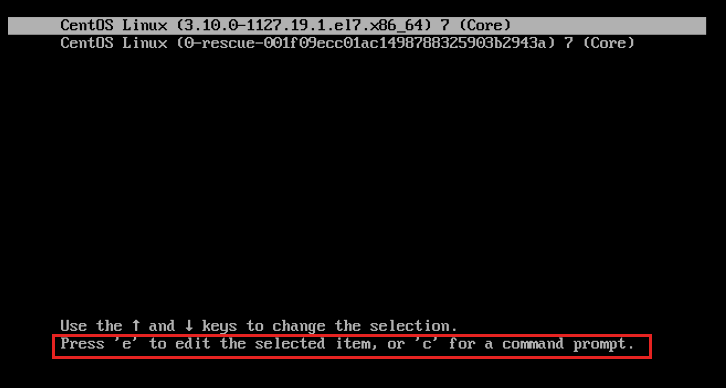
进入启动菜单后,按e键可以修改选定的启动项。
进入启动菜单后,按c键直接进入到grub的命令行,对grub参数进行配置。

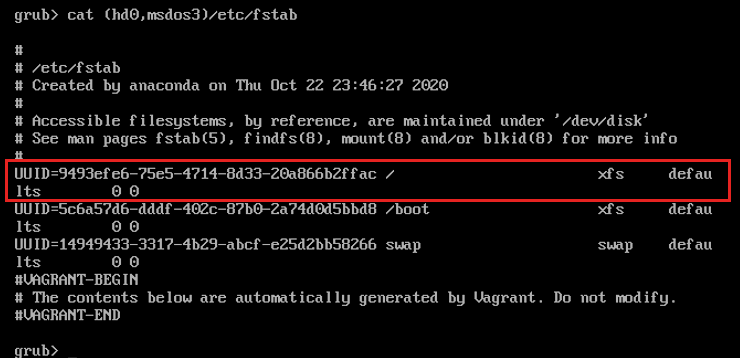
此时,不知道哪个分区是boot分区,哪个分区是根分区。可以通过set root=xxx来测试
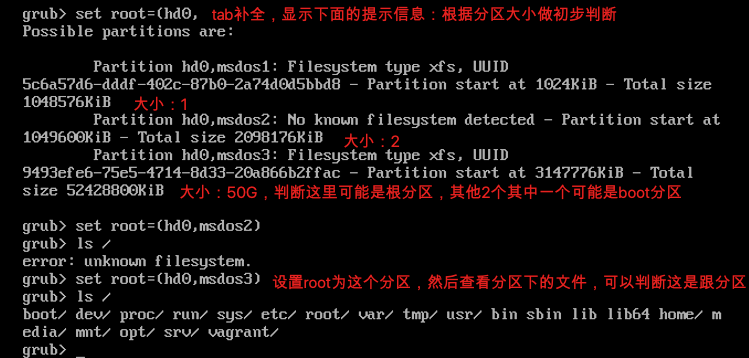

或者这样判断:
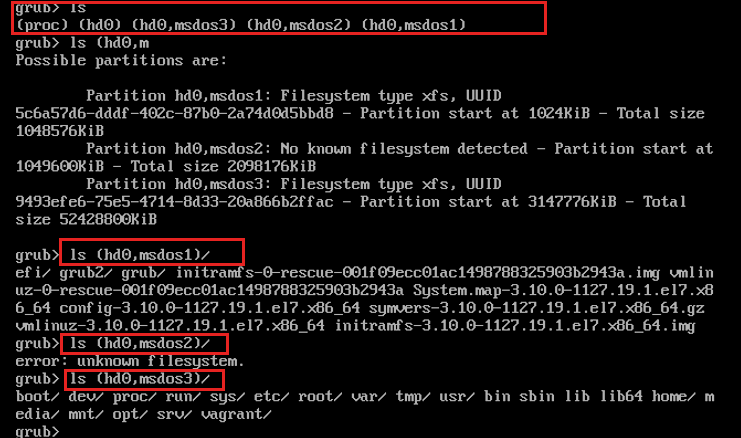
此时,已经可以确定,(hd0,msdos1)为boot分区,(hd0,msdos3)位根分区。
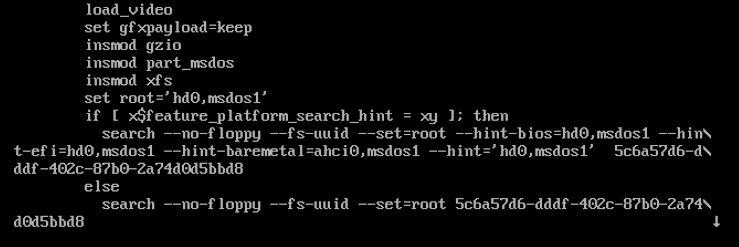
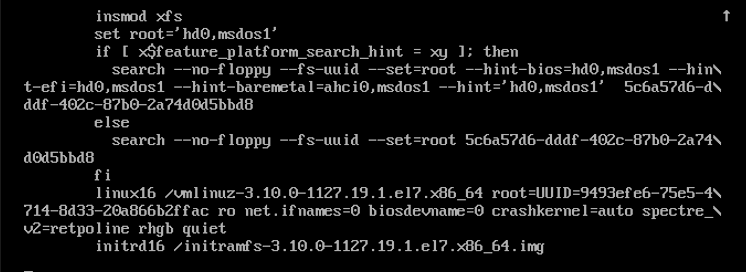
insmod 插入模块:gzio对io的压缩;xfs文件系统
rhgb:red hat graphic
quiet:静默
找到Linux的/boot分区,以及/根分区所在的磁盘位置
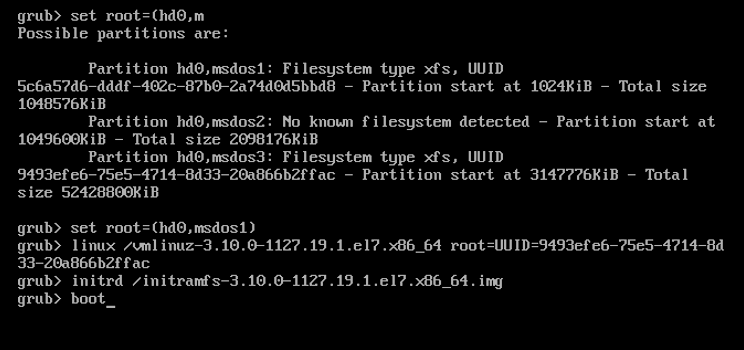
指定Linux内核,及/所在分区
initrd命令指定initrd文件
boot命令启动
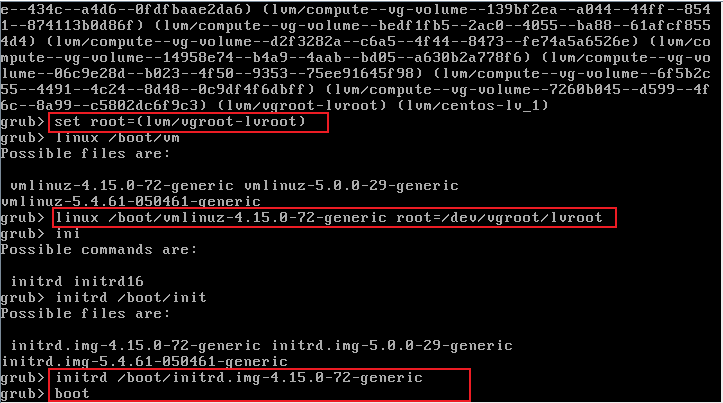
说明:
linux ….. root=UUID=
这个的root=是指定一个root的dev设备文件,例如
root=/dev/vgroot/lvroot,而不能写成root=(lvm/vgroot-lvroot)
参考: